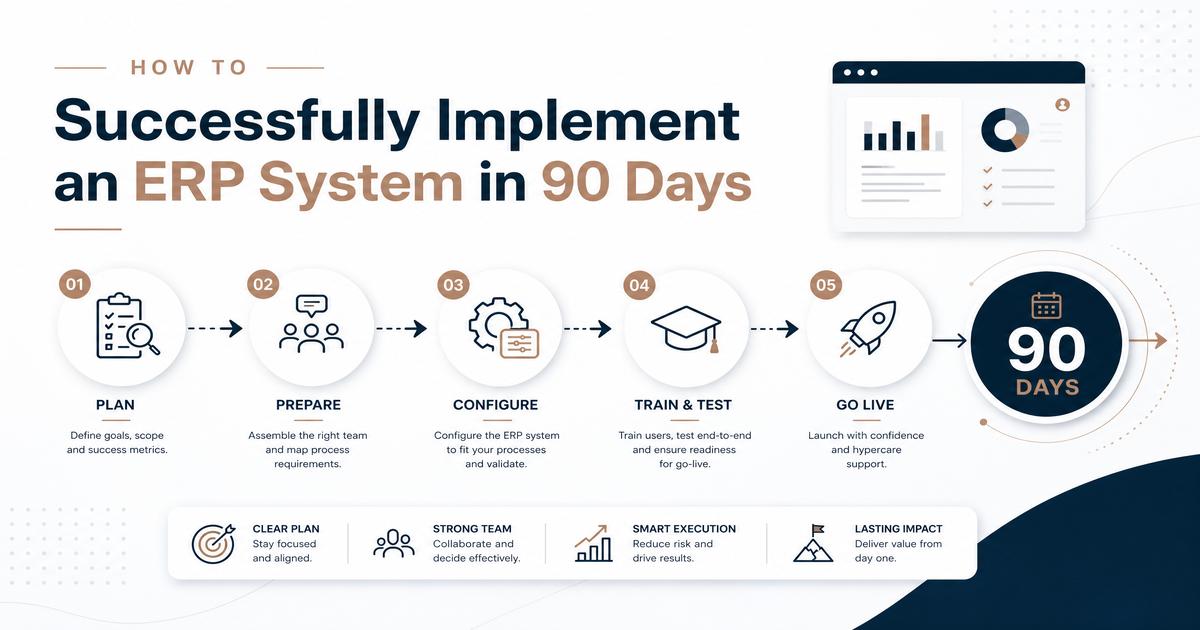
How to Successfully Implement an ERP System in 90 Days
Implementing an Enterprise Resource Planning (ERP) system is a significant undertaking for any organization, promising enhanced efficiency, streamlined operations, and improved decision-making. However, the success of such a project hinges on meticulous planning and execution. This guide provides a comprehensive, step-by-step approach to successfully implementing an ERP system within a challenging 90-day timeframe. We will delve into critical phases, best practices, and strategies to overcome common hurdles, ensuring your organization can leverage the full potential of its new ERP solution swiftly and effectively. Whether you’re a small business looking to scale or a large enterprise aiming to optimize, this guide will equip you with the knowledge to navigate the complexities of ERP implementation with confidence.
Understanding ERP Systems and Their Benefits
What is an ERP System?
An Enterprise Resource Planning (ERP) system is a suite of integrated software applications that an organization can use to manage and integrate the essential parts of its business. Many ERP software applications are critical to companies because they help them implement resource planning by integrating all the processes needed to run their companies with a single system. An ERP system can integrate planning, purchasing, inventory, sales, marketing, finance, human resources, and more. The primary goal of an ERP system is to improve organizational efficiency and productivity by providing a holistic view of operations and facilitating data flow across different departments.
Key Benefits of ERP Implementation
Implementing an ERP system offers a multitude of benefits that can significantly impact an organization’s bottom line and operational efficiency. These include:
- Improved Efficiency and Productivity: By automating routine tasks and streamlining workflows, ERP systems reduce manual effort and accelerate business processes. This leads to higher productivity and allows employees to focus on more strategic initiatives.
- Enhanced Data Visibility and Reporting: A centralized database provides a single source of truth for all business data. This improved data visibility enables real-time reporting and analytics, empowering better-informed decision-making across all departments.
- Cost Reduction: While the initial investment can be substantial, ERP systems often lead to long-term cost savings through optimized inventory management, reduced operational inefficiencies, and better resource allocation.
- Better Customer Service: With integrated customer data, sales, and service modules, businesses can gain a comprehensive view of their customers, leading to more personalized interactions and improved customer satisfaction.
- Streamlined Supply Chain Management: ERP systems facilitate better coordination with suppliers and customers, optimizing inventory levels, reducing lead times, and improving overall supply chain responsiveness.
- Regulatory Compliance and Risk Management: ERP solutions often come with built-in features that help organizations comply with industry regulations and mitigate risks by providing robust audit trails and data security.
Phase 1: Preparation and Planning (Days 1-30)
Define Your Objectives and Requirements
The first critical step in any successful ERP implementation is to clearly define your organization’s objectives and detailed requirements. This involves understanding what you aim to achieve with the new system and what functionalities are essential. Begin by:
- Identifying Business Goals: What strategic objectives will the ERP system support? (e.g., reduce operational costs by 15%, improve order fulfillment time by 20%, enhance data accuracy).
- Documenting Current Processes: Map out your existing business processes to identify pain points, inefficiencies, and areas for improvement. This will help in understanding how the new ERP system can optimize these processes.
- Gathering Requirements from Stakeholders: Engage with key stakeholders from all departments (finance, HR, sales, operations, IT) to understand their specific needs and expectations from the new system. Categorize requirements as ‘must-have,’ ‘should-have,’ and ‘nice-to-have.’
- Establishing Key Performance Indicators (KPIs): Define measurable KPIs that will be used to track the success of the ERP implementation and its impact on business operations post-launch.
Assemble Your Project Team
A dedicated and skilled project team is paramount for a smooth ERP implementation. The team should comprise individuals with diverse expertise and roles:
- Executive Sponsor: A senior leader who champions the project, secures resources, and removes organizational roadblocks.
- Project Manager: Responsible for overseeing the entire project, managing timelines, budgets, and communication.
- Functional Leads: Representatives from each department (e.g., finance, HR, supply chain) who understand their department’s processes and can articulate requirements.
- IT Specialists: Experts in infrastructure, data migration, and system integration.
- Key Users/Subject Matter Experts (SMEs): End-users who will provide valuable insights into daily operations and assist with testing and training.
Ensure clear roles and responsibilities are defined for each team member to foster accountability and efficient collaboration.
Select the Right ERP Solution
Choosing the right ERP system is a critical decision that will impact your organization for years to come. This selection process should be thorough and data-driven:
- Research Potential Vendors: Based on your defined requirements, research ERP vendors that offer solutions aligning with your industry, business size, and specific needs. Consider factors like vendor reputation, industry experience, and customer support.
- Request for Proposal (RFP): Develop a detailed RFP outlining your requirements, technical specifications, and desired functionalities. Send this to shortlisted vendors to solicit comprehensive proposals.
- Vendor Demonstrations: Schedule demonstrations with vendors to see their systems in action. Focus on how their solution addresses your specific use cases and pain points. Involve key stakeholders in these demonstrations.
- Evaluate Total Cost of Ownership (TCO): Beyond initial licensing or subscription fees, consider the TCO, which includes implementation costs, customization, training, maintenance, and potential upgrades. Look for transparent pricing models.
- Check References: Speak to existing customers of the shortlisted vendors to gain insights into their experience with the system, implementation process, and ongoing support.
- Negotiate Contracts: Once a vendor is selected, carefully review and negotiate the contract terms, ensuring that service level agreements (SLAs), support, and future scalability are clearly defined.
Phase 2: Implementation and Configuration (Days 31-60)
Data Migration and Integration
Data migration is one of the most critical and often complex aspects of ERP implementation. A flawed data migration can lead to significant operational disruptions and inaccurate reporting. This phase involves:
- Data Cleansing and Validation: Before migrating, cleanse your existing data to remove duplicates, inaccuracies, and outdated information. Validate the data to ensure its integrity and consistency.
- Data Mapping: Map data from your legacy systems to the new ERP system’s structure. This involves identifying how each piece of information in your old system corresponds to a field in the new system.
- Extract, Transform, Load (ETL): Develop a robust ETL strategy. Extract data from source systems, transform it to fit the new ERP format, and load it into the new system. This often involves scripting and specialized tools.
- Integration with Other Systems: Identify and plan for integrations with other critical business systems that will not be replaced by the ERP (e.g., CRM, e-commerce platforms). This ensures seamless data flow across your entire technology landscape.
System Configuration and Customization
Once data migration is underway, the focus shifts to configuring the ERP system to align with your business processes and requirements. This phase includes:
- Core System Setup: Configure the foundational elements of the ERP system, such as organizational structure, chart of accounts, user roles, and security permissions.
- Module Configuration: Tailor individual modules (e.g., finance, procurement, manufacturing) to match your specific operational workflows and business rules. This might involve setting up approval hierarchies, pricing rules, or production schedules.
- Customization vs. Configuration: Understand the difference between configuration (using the system’s built-in flexibility to adapt) and customization (modifying the system’s core code). Prioritize configuration to minimize future upgrade complexities and costs. Only customize when absolutely necessary and no configuration option exists.
- Workflow Automation: Implement automated workflows for routine tasks, such as purchase order approvals, invoice processing, or customer service requests, to enhance efficiency and reduce manual errors.
- Reporting and Analytics Setup: Configure standard and custom reports, dashboards, and analytical tools to provide key insights into business performance and support decision-making.
User Training and Change Management
Successful ERP adoption heavily relies on effective user training and proactive change management. Without these, even the most robust system can fail to deliver its promised value:
- Develop a Comprehensive Training Plan: Create a structured training program tailored to different user groups (e.g., finance, sales, warehouse staff). Training should cover system navigation, key functionalities, and how the new system impacts their daily tasks.
- Provide Hands-on Training: Offer practical, hands-on training sessions with realistic scenarios. Utilize test environments where users can practice without affecting live data.
- Create Training Materials: Develop user manuals, quick reference guides, FAQs, and online tutorials that users can access for ongoing support.
- Communicate Benefits and Address Concerns: Clearly communicate the benefits of the new ERP system to all employees. Address any concerns or resistance to change through open dialogue, workshops, and individual coaching. Highlight how the system will make their jobs easier and more efficient.
- Identify Change Champions: Enlist key users or early adopters as change champions who can advocate for the new system, provide peer support, and help drive adoption within their departments.
- Establish a Support System: Set up clear channels for users to get help and support after go-live, such as a help desk, dedicated support team, or internal knowledge base.
Phase 3: Testing, Deployment, and Post-Launch (Days 61-90)
Comprehensive Testing and Quality Assurance
Thorough testing is crucial to identify and rectify any issues before the system goes live. This phase should include:
- Unit Testing: Test individual components and modules of the ERP system to ensure they function as designed.
- Integration Testing: Verify that different modules and integrated systems communicate and exchange data correctly.
- User Acceptance Testing (UAT): Involve key users in testing real-world business scenarios to ensure the system meets their needs and expectations. UAT is vital for user buy-in and identifying any gaps.
- Performance Testing: Assess the system’s responsiveness and stability under expected and peak load conditions to ensure it can handle your organization’s transaction volumes.
- Security Testing: Conduct security audits and penetration testing to identify and address vulnerabilities, ensuring data protection and compliance.
- Regression Testing: After any bug fixes or changes, re-run previous tests to ensure that new issues haven’t been introduced.
Go-Live and Post-Implementation Support
The culmination of your efforts is the go-live phase, followed by crucial post-implementation support:
- Go-Live Strategy: Plan a phased rollout or a big-bang approach based on your organization’s risk tolerance and complexity. Ensure all necessary resources are available during this critical period.
- Data Validation Post-Go-Live: Immediately after go-live, validate critical data and transactions to ensure accuracy and smooth operation. Monitor system performance closely.
- Dedicated Support Team: Establish a dedicated support team or help desk to address user queries, issues, and provide immediate assistance during the initial weeks and months post-go-live.
- Performance Monitoring: Continuously monitor the ERP system’s performance, identifying and resolving any bottlenecks or issues that arise. Track KPIs to ensure the system is delivering the expected benefits.
- Feedback Loop: Create a mechanism for users to provide feedback on the system, which can be used for ongoing improvements and optimizations.
Continuous Improvement and Optimization
An ERP implementation is not a one-time event but an ongoing journey of optimization. To ensure long-term success and maximize ROI:
- Regular System Audits: Periodically review the ERP system to ensure it continues to meet business needs and identify areas for further optimization or new functionalities.
- Performance Reviews: Conduct regular performance reviews of the system and its impact on business processes. Use the defined KPIs to measure success and identify areas for improvement.
- User Feedback and Training Refreshers: Continue to gather user feedback and provide refresher training as needed, especially when new features are rolled out or processes are updated.
- Stay Updated with Vendor Releases: Keep abreast of new releases, patches, and updates from your ERP vendor. Implement relevant updates to leverage new features, improve security, and maintain system stability.
- Strategic Planning: Align your ERP roadmap with your overall business strategy. As your business evolves, your ERP system should adapt to support new initiatives and growth.
Common Challenges and How to Overcome Them
Resistance to Change
One of the most significant hurdles in ERP implementation is user resistance. Employees may be comfortable with existing processes, fear job displacement, or be overwhelmed by learning a new system. To mitigate this:
- Early and Consistent Communication: Start communicating about the ERP project early, highlighting its benefits for individuals and the organization. Be transparent about changes and address concerns openly.
- Involve Users in the Process: Engage key users and stakeholders throughout the project lifecycle, from requirements gathering to testing. This fosters a sense of ownership and reduces resistance.
- Comprehensive Training: Provide thorough and ongoing training that is relevant to each user group. Emphasize hands-on practice and offer continuous support.
- Executive Sponsorship: Strong leadership and visible support from senior management can help reinforce the importance of the project and encourage adoption.
Data Quality Issues
Poor data quality can severely undermine the effectiveness of an ERP system. Inaccurate, incomplete, or inconsistent data can lead to flawed reporting, poor decision-making, and operational inefficiencies. To address this:
- Data Cleansing Strategy: Implement a robust data cleansing strategy before migration. This involves identifying, correcting, and removing erroneous data from legacy systems.
- Data Governance Policies: Establish clear data governance policies and procedures to ensure data accuracy, consistency, and integrity on an ongoing basis. Define data ownership, standards, and validation rules.
- Automated Data Validation: Utilize the ERP system’s built-in data validation features and implement automated checks to prevent the entry of incorrect data.
- Regular Data Audits: Conduct regular audits of the ERP system’s data to identify and rectify any quality issues proactively.
Scope Creep
Scope creep, the uncontrolled expansion of a project’s scope, can derail ERP implementations by extending timelines, increasing costs, and diluting focus. To manage scope creep:
- Clear Scope Definition: Establish a well-defined project scope at the outset, detailing what is included and, importantly, what is excluded from the implementation.
- Formal Change Management Process: Implement a formal change request process for any proposed additions or modifications to the project scope. Each change should be evaluated for its impact on timeline, budget, and resources.
- Prioritization: Continuously prioritize requirements and functionalities. Be prepared to defer non-essential features to a later phase or post-implementation.
- Regular Communication: Maintain open and regular communication with all stakeholders to manage expectations and ensure everyone is aligned with the project’s scope.
Conclusion
Implementing an ERP system in 90 days is an ambitious but achievable goal with meticulous planning, dedicated resources, and a clear understanding of the challenges involved. By following the structured approach outlined in this guide—from thorough preparation and planning to careful implementation, configuration, and robust post-launch support—organizations can significantly increase their chances of success. Addressing common pitfalls like resistance to change, data quality issues, and scope creep proactively will further safeguard your investment and ensure that your new ERP system delivers transformative benefits to your business. Remember, a successful ERP implementation is not just about technology; it’s about people, processes, and a commitment to continuous improvement.
Call to Action
Ready to transform your business operations with a new ERP system? Visit SaaSSync Pro to compare leading ERP solutions, read in-depth reviews, and find the perfect software to kickstart your 90-day implementation journey. Our comprehensive resources and expert insights will help you make an informed decision and achieve ERP success.