How to Build a Lead Scoring Model with Marketing Automation
The Strategic Importance of Lead Scoring in Modern B2B Marketing
In the high-stakes world of B2B lead generation, not all leads are created equal. Some prospects are ready to sign a contract yesterday, while others are simply “kicking the tires” or researching for a project that might happen in two years. If your sales team is treating every lead with the same level of urgency, you are likely wasting valuable resources and letting high-value opportunities slip through the cracks. This is where a lead scoring model becomes an indispensable asset.
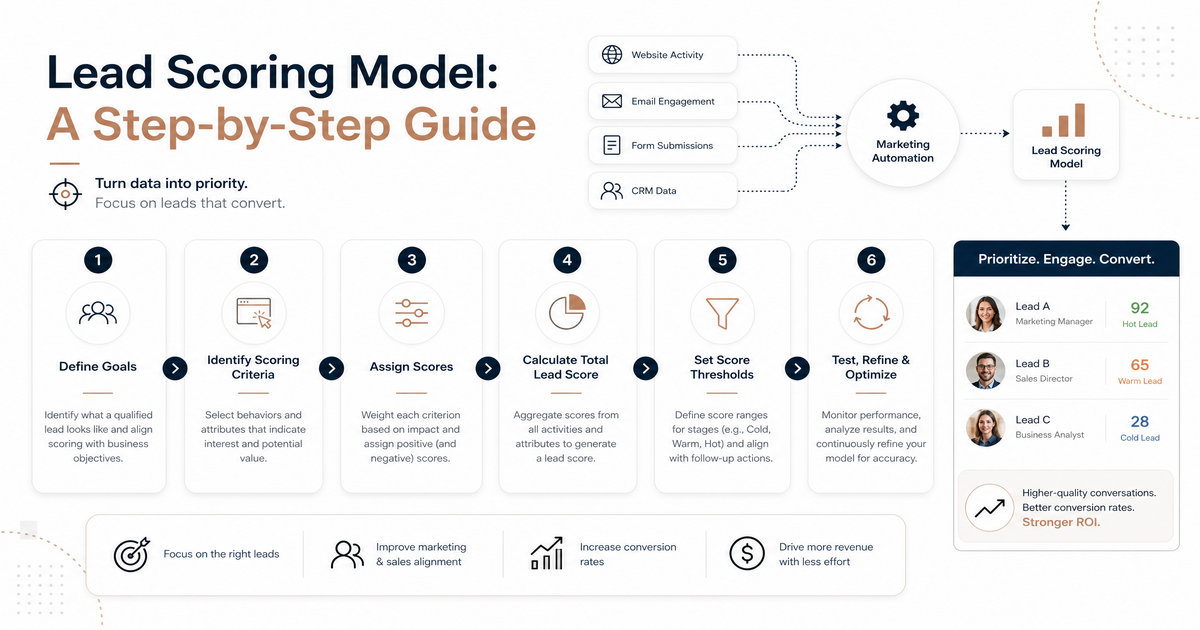
Lead scoring is a shared methodology used by sales and marketing teams to rank prospects against a scale that represents the perceived value each lead represents to the organization. By leveraging marketing automation, businesses can automate this process, ensuring that the hottest leads are fast-tracked to sales while cooler leads are nurtured until they are ready to buy. When executed correctly, lead scoring drives sales and marketing alignment, increases conversion rates, and shortens the sales cycle.
In this guide, we will walk you through the practical, step-by-step process of building a robust lead scoring model that integrates seamlessly with your marketing automation platform.
Understanding the Two Pillars of Lead Scoring: Explicit vs. Implicit Data
A successful lead scoring model relies on two distinct types of data. To build a balanced system, you must weigh “who the lead is” against “what the lead does.”
1. Explicit Data (The “Who”)
Explicit data is information provided directly by the lead or gathered through third-party data enrichment tools. This data tells you if the prospect fits your Ideal Customer Profile (ICP). Common explicit data points include:
- Job Title and Seniority (e.g., Manager vs. C-Suite)
- Industry or Vertical
- Company Size (Revenue or Employee Count)
- Geographic Location
- Technology Stack
2. Implicit Data (The “What”)
Implicit data is gathered by tracking a lead’s behavior and engagement with your brand. This data indicates the lead’s level of interest and where they might be in the buyer’s journey. Examples include:
- Website visits (specifically high-intent pages like Pricing or Demo Request)
- Email engagement (opens and clicks)
- Content downloads (whitepapers, case studies, or e-books)
- Webinar attendance or event registration
- Social media interactions
Step 1: Achieve Sales and Marketing Alignment (Smarketing)
Before you touch your marketing automation software, you must get your sales and marketing teams in the same room. The most common reason lead scoring models fail is a lack of consensus on what constitutes a “qualified” lead.
Marketing might think a lead who downloads three e-books is “hot,” while Sales might find those leads are often just students or researchers with no budget. You must define your lead qualification criteria together. Ask your sales team: “What characteristics do our best customers share?” and “Which behaviors typically precede a closed-won deal?”
During this phase, define your Marketing Qualified Lead (MQL) and Sales Qualified Lead (SQL) thresholds. An MQL is a lead that has reached a certain score and is ready for a sales handoff, whereas an SQL is a lead that Sales has vetted and accepted into the active pipeline.
Step 2: Define Your Scoring Criteria and Weighting
Once you have alignment, it’s time to assign point values to different attributes and actions. Not all actions are equal; a “Request a Quote” form fill is significantly more valuable than a “Like” on a LinkedIn post.
Below is a sample weighting table to help you visualize how to distribute points:
| Category | Action/Attribute | Points Assigned |
|---|---|---|
| Explicit | Job Title: VP or C-Level | +15 |
| Explicit | Target Industry (e.g., SaaS, Fintech) | +10 |
| Explicit | Company Size: 500+ Employees | +10 |
| Implicit | Visited Pricing Page | +15 |
| Implicit | Downloaded Case Study | +10 |
| Implicit | Attended Live Webinar | +20 |
| Implicit | Opened General Newsletter | +2 |
Remember, the total score should reflect a combination of fit and intent. A lead with a perfect “fit” but zero “intent” needs marketing nurture, while a lead with high “intent” but poor “fit” should likely be disqualified to save Sales’ time.
Step 3: Incorporate Negative Scoring and Lead Decay
A great lead scoring model doesn’t just add points; it also subtracts them. Negative scoring helps filter out leads that are unlikely to buy, preventing your CRM from becoming cluttered with low-quality data.
When to use Negative Scoring:
- Unsuitable Job Titles: If your product is for CEOs, subtract points for titles like “Student,” “Intern,” or “Consultant.”
- Competitors: Use email domain filters to subtract points (or disqualify) anyone using a competitor’s domain.
- Spam Indicators: Subtract points for generic email addresses (e.g., @gmail.com or @yahoo.com) if you are strictly B2B.
- Bouncing Emails: If an email bounces, the lead’s score should drop significantly.
Implementing Lead Decay
Interest fades over time. A lead who visited your site 10 times last week is hot; a lead who visited 10 times six months ago is cold. Lead decay (or score degradation) automatically reduces a lead’s score after a period of inactivity. For example, you might subtract 10 points for every 30 days of no engagement. This ensures that your sales team is always focused on the most current opportunities.
Step 4: Setting the Threshold for Sales Handoff
Now that you have a point system, you need to decide at what number a lead becomes an MQL. This is your “threshold.”
If you set the threshold too low, Sales will be overwhelmed with low-quality leads and will eventually stop trusting the marketing automation system. If you set it too high, you might miss out on opportunities because leads aren’t being contacted fast enough.
Pro Tip: Look at your historical data. Analyze the last 50 deals your sales team closed. What were their average scores at the time of the first sales contact? This historical benchmark is the best starting point for setting your initial threshold.
Step 5: Implementing the Model in Your Marketing Automation Tool
With your logic mapped out on paper (or a spreadsheet), it’s time to build it within your marketing automation platform (e.g., HubSpot, Marketo, Pardot, or ActiveCampaign).
Most platforms offer a dedicated “Lead Scoring” or “Calculated Properties” section. Here is how to approach the implementation:
- Create Rules: Set up individual rules for each data point defined in Step 2.
- Automate Notifications: Set up a workflow that triggers an internal notification to the assigned sales rep the moment a lead crosses the MQL threshold.
- Sync with CRM: Ensure that the lead score is mapped to a field in your CRM (like Salesforce) so that Sales can see the score and the specific actions that led to it.
- Segment Your Database: Use the scores to bucket leads into different nurturing tracks. Leads with scores of 0-30 might get educational content, while those at 70+ get “Bottom of the Funnel” offers like free trials or consultations.
Step 6: Test, Analyze, and Refine
A lead scoring model is not a “set it and forget it” project. It is a living document that requires constant optimization. Within the first 90 days of implementation, schedule monthly check-ins between Sales and Marketing to review lead quality.
Key Questions for the Review Phase:
- Are the leads reaching the threshold actually qualified?
- Are there “junk” leads getting through? (If so, add negative scoring rules).
- Is Sales following up with MQLs within the agreed-upon timeframe?
- Are there high-value leads that aren’t reaching the threshold? (If so, you may need to increase points for certain behaviors).
Advanced teams may eventually move toward predictive lead scoring. This uses machine learning to analyze your CRM data and automatically identify the patterns that lead to conversions, removing much of the manual guesswork involved in traditional scoring.
Common Pitfalls to Avoid in Lead Scoring
Even the most experienced marketers can stumble when setting up lead scoring. Here are a few traps to avoid:
- Over-complicating the model: Start simple. You don’t need 50 different rules on day one. Start with the top 5 explicit and top 5 implicit triggers.
- Ignoring the “Inflated” Score: A lead who visits your blog 50 times might have a high score but could just be a fan of your content rather than a buyer. Ensure high-intent pages (like Pricing) carry significantly more weight than educational pages.
- Forgetting the Human Element: No model is perfect. Always provide a way for Sales to manually “fast-track” a lead or provide feedback that overrides the automated score.
- Static Scoring: Failing to account for time (decay) leads to “ghost leads” sitting at the top of your priority list for months.
The Bottom Line: Transforming Data into Revenue
Building a lead scoring model with marketing automation is one of the most effective ways to scale your B2B lead generation efforts. It moves your marketing team away from “vanity metrics” (like total leads) and toward “revenue metrics” (like pipeline contribution). By focusing your sales team’s energy on the prospects most likely to convert, you improve efficiency, boost morale, and ultimately drive higher ROI from your marketing spend.
The journey to a perfect lead scoring model begins with a single step: alignment. Once Sales and Marketing are speaking the same language, the technology simply serves as the engine to execute that shared vision.
Ready to Optimize Your Tech Stack?
Choosing the right marketing automation tool is the foundation of a successful lead scoring strategy. At SaaSSync Pro, we provide in-depth reviews and side-by-side comparisons of the leading marketing and sales software to help you make informed decisions. Whether you are looking for a platform with advanced predictive scoring or a user-friendly tool for a growing startup, we’ve got you covered.
Explore our latest reviews and find the perfect marketing automation partner for your business today!