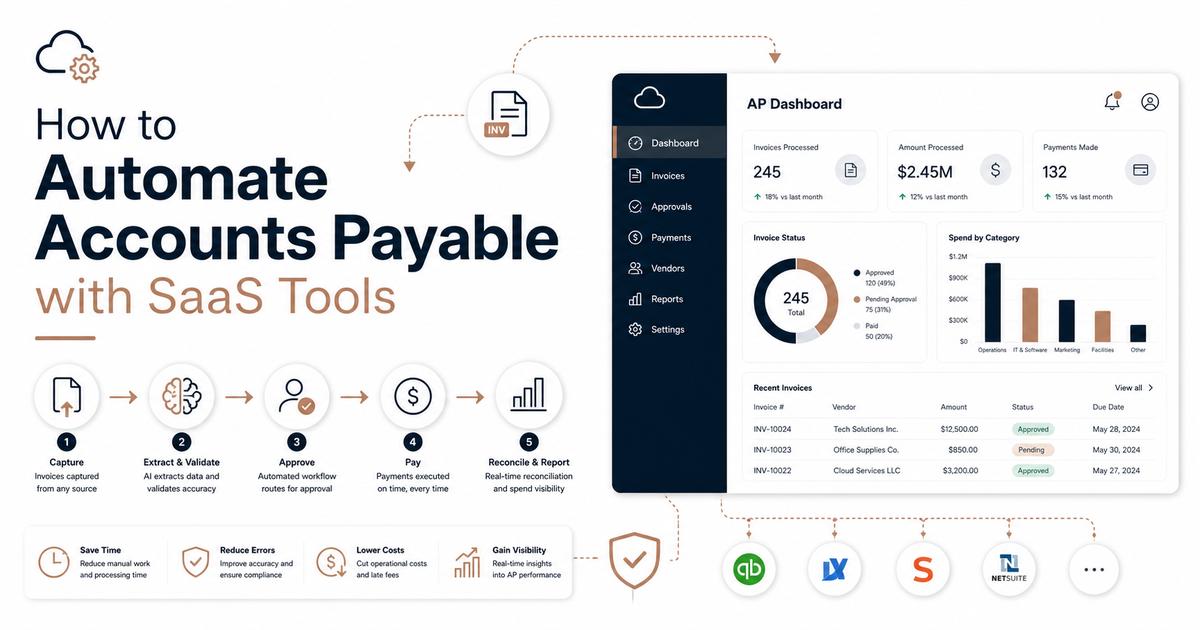
How to Automate Accounts Payable with SaaS Tools
Introduction: Streamlining Your Financial Operations with Accounts Payable Automation
In today’s fast-paced business environment, managing financial operations efficiently is paramount. Accounts Payable (AP) is a critical function, yet it often remains a manual, time-consuming, and error-prone process. From receiving invoices to making payments, traditional AP workflows can hinder productivity, increase operational costs, and expose businesses to risks. Fortunately, the advent of Software as a Service (SaaS) tools has revolutionized how companies approach AP, offering robust solutions for automation.
This guide will delve into the world of Accounts Payable automation, specifically focusing on how SaaS tools can transform your financial processes. We’ll explore the benefits, key features to look for, and provide a step-by-step approach to implementing an automated AP system. By the end, you’ll have a clear understanding of how to leverage technology to achieve greater efficiency, accuracy, and control over your expenditures.
Understanding Accounts Payable Automation
What is Accounts Payable Automation?
Accounts Payable automation refers to the use of technology to streamline and optimize the entire lifecycle of an invoice, from its receipt to payment. This process minimizes manual intervention, reduces human error, and accelerates the payment cycle. Instead of physically handling paper invoices, manually entering data, and chasing approvals, automation leverages digital tools to manage these tasks.
SaaS-based AP automation solutions are cloud-hosted platforms that allow businesses to manage their AP processes from anywhere, at any time. These tools typically integrate with existing accounting software, enterprise resource planning (ERP) systems, and banking platforms, creating a cohesive and efficient financial ecosystem.
Why is AP Automation Crucial for Modern Businesses?
The shift towards digital transformation has made AP automation not just a luxury, but a necessity for businesses aiming for sustainable growth and competitive advantage. Manual AP processes are inherently inefficient, leading to:
- High Operational Costs: Labor-intensive tasks like data entry, reconciliation, and filing consume significant resources.
- Increased Risk of Errors: Manual data input is prone to mistakes, leading to payment delays, duplicate payments, and reconciliation issues.
- Lack of Visibility and Control: Without a centralized system, tracking invoice statuses and managing cash flow becomes challenging.
- Vulnerability to Fraud: Manual processes can create loopholes that fraudsters exploit, leading to financial losses.
- Slow Approval Cycles: Paper-based approvals can cause significant delays, potentially straining vendor relationships and missing early payment discounts.
Benefits of AP Automation with SaaS Tools
Implementing SaaS-based Accounts Payable automation brings a multitude of benefits that directly impact a company’s bottom line and operational efficiency.
Cost Savings and Enhanced Efficiency
One of the most immediate advantages of AP automation is the significant reduction in operational costs. By eliminating manual data entry and paper-based processes, businesses save on labor, printing, postage, and storage expenses. Automated workflows accelerate invoice processing, allowing AP teams to handle a higher volume of invoices with fewer resources. This enhanced efficiency frees up staff to focus on more strategic tasks, such as financial analysis and vendor relationship management.
Improved Accuracy and Reduced Errors
SaaS AP automation tools utilize technologies like Optical Character Recognition (OCR) to capture invoice data accurately, drastically reducing the potential for human error. Automated matching of invoices to purchase orders and receipts ensures data integrity. This leads to fewer discrepancies, fewer duplicate payments, and more accurate financial reporting, which is crucial for compliance and informed decision-making.
Greater Visibility and Control Over Spending
With a centralized digital platform, businesses gain real-time visibility into their entire Accounts Payable process. Dashboards and reporting features provide insights into invoice statuses, payment trends, and spending patterns. This enhanced control allows finance teams to better manage cash flow, forecast expenses, and identify opportunities for cost optimization. Automated audit trails also ensure transparency and accountability for every transaction.
Stronger Fraud Prevention and Compliance
AP automation tools incorporate robust security features and controls that significantly mitigate the risk of fraud. Automated three-way matching (invoice, purchase order, receipt) helps prevent fraudulent invoices from being processed. Role-based access, audit trails, and automated alerts for suspicious activities add layers of protection. Furthermore, these systems help businesses maintain compliance with financial regulations by ensuring proper documentation and adherence to internal policies.
Enhanced Vendor Relationships
Timely and accurate payments are fundamental to maintaining strong relationships with vendors. AP automation ensures that invoices are processed and paid on schedule, reducing late payment penalties and improving vendor satisfaction. Many SaaS solutions also offer vendor portals, allowing suppliers to track their invoice status, which further enhances transparency and communication.
Key Features to Look for in AP Automation SaaS Tools
When selecting an AP automation SaaS tool, it’s essential to consider a range of features that will best serve your business needs. A robust solution should offer comprehensive functionalities to streamline every aspect of the accounts payable process.
Invoice Capture and Data Extraction
- OCR Technology: Advanced Optical Character Recognition (OCR) for accurate data extraction from various invoice formats (PDFs, images, emails).
- Automated Data Entry: Minimizes manual input, reducing errors and saving time.
- Multi-Channel Invoice Submission: Support for receiving invoices via email, supplier portals, EDI, and direct uploads.
Workflow Automation and Approvals
- Configurable Workflows: Ability to customize approval workflows based on company policies, departments, and invoice amounts.
- Automated Routing: Invoices are automatically routed to the correct approvers, accelerating the approval cycle.
- Mobile Approvals: Allows approvers to review and approve invoices on the go, preventing bottlenecks.
- Audit Trails: Comprehensive logging of all actions and approvals for compliance and transparency.
Integration Capabilities
- ERP/Accounting Software Integration: Seamless integration with popular accounting systems (e.g., QuickBooks, SAP, Oracle, NetSuite) to ensure data consistency.
- Payment System Integration: Connectivity with banking platforms for automated payment processing.
- API Access: For custom integrations with other business applications.
Reporting and Analytics
- Real-time Dashboards: Provide an overview of AP status, key metrics, and pending approvals.
- Customizable Reports: Generate reports on spending, vendor performance, and efficiency gains.
- Cash Flow Forecasting: Tools to help predict future cash outflows based on invoice data.
Vendor Management
- Vendor Portal: A self-service portal for vendors to submit invoices, check payment status, and update their information.
- Centralized Vendor Database: Maintains accurate and up-to-date vendor information.
How to Implement AP Automation with SaaS Tools: A Step-by-Step Guide
Implementing an AP automation solution requires careful planning and execution to ensure a smooth transition and maximize benefits. Here’s a step-by-step guide to help you through the process:
Step 1: Assess Your Current AP Process
Before you can automate, you need to understand your existing AP workflow. Document every step, from invoice receipt to payment. Identify pain points, bottlenecks, and areas where errors frequently occur. This assessment will help you define your requirements for an automation solution.
Step 2: Define Your Requirements and Set Goals
Based on your assessment, create a detailed list of features and functionalities your ideal AP automation tool should possess. Set clear, measurable goals for what you want to achieve with automation, such as reducing processing time by a certain percentage, improving data accuracy, or enhancing fraud prevention.
Step 3: Research and Select a SaaS AP Automation Solution
With your requirements in hand, research various SaaS AP automation providers. Look for solutions that align with your budget, integrate with your existing systems, and offer the features you need. Request demos, read reviews, and compare pricing models. Consider factors like scalability, security, and customer support.
Step 4: Plan for Integration and Configuration
Once you’ve selected a solution, work with the provider to plan the integration with your accounting software or ERP system. Configure the platform to match your specific approval workflows, coding rules, and company policies. This step is crucial for ensuring seamless data flow and operational efficiency.
Step 5: Pilot Program and User Training
Start with a pilot program involving a small group of users or a specific department to test the new system. Gather feedback and make any necessary adjustments. Once the pilot is successful, roll out the solution to the entire AP team. Provide comprehensive training to all users to ensure they are comfortable and proficient with the new system.
Step 6: Monitor, Optimize, and Scale
After full implementation, continuously monitor the performance of your AP automation system. Track key metrics to ensure you are meeting your goals. Identify areas for further optimization and leverage the analytics features of the SaaS tool to gain deeper insights. As your business grows, scale the solution to accommodate increasing invoice volumes and evolving needs.
Conclusion: Embrace the Future of Accounts Payable
Accounts Payable automation with SaaS tools is no longer a luxury but a strategic imperative for businesses looking to thrive in the digital age. By embracing automation, companies can move beyond the inefficiencies of manual processes, unlocking significant cost savings, improving accuracy, and gaining unparalleled control over their financial operations. The benefits extend beyond the finance department, fostering stronger vendor relationships and providing valuable insights for strategic decision-making.
The journey to automated AP begins with a clear understanding of your current processes, a thoughtful selection of the right SaaS solution, and a structured implementation plan. By following the steps outlined in this guide, your organization can successfully transition to a more efficient, secure, and transparent accounts payable system. Don’t let outdated processes hold your business back; embrace the future of AP and empower your finance team to drive greater value.
Call to Action: Ready to transform your Accounts Payable process? Explore leading SaaS AP automation solutions today and take the first step towards a more efficient and controlled financial future!