How to Automate Your Bookkeeping with SaaS Accounting Tools
Introduction: The Dawn of Automated Bookkeeping
In today’s fast-paced business environment, efficient financial management is paramount. Manual bookkeeping, with its repetitive tasks and potential for human error, can be a significant drain on resources and time. Fortunately, the advent of Software as a Service (SaaS) accounting tools has revolutionized how businesses manage their finances, offering powerful automation capabilities that streamline processes, enhance accuracy, and provide real-time insights. This comprehensive guide will walk you through the benefits of automating your bookkeeping with SaaS accounting tools, key features to look for, and a step-by-step process to implement automation effectively.
Why Automate Bookkeeping with SaaS Accounting Tools?
Automating your bookkeeping is not just about saving time; it’s about transforming your financial operations into a more efficient, accurate, and insightful system. SaaS accounting tools, in particular, bring a host of advantages:
Increased Accuracy and Reduced Errors
- Elimination of Manual Data Entry: Automated systems reduce the need for manual input, significantly minimizing the risk of typos and transposition errors.
- Automated Reconciliation: Many SaaS tools automatically reconcile bank and credit card statements with your transactions, flagging discrepancies instantly.
Significant Time and Cost Savings
- Streamlined Workflows: Tasks like invoicing, expense tracking, and payroll can be automated, freeing up valuable time for strategic activities.
- Reduced Labor Costs: Automation can decrease the need for extensive manual labor, leading to cost savings in the long run.
Real-time Financial Insights
- Up-to-date Financial Reports: Access real-time data on your cash flow, profits, and expenses, enabling quicker and more informed decision-making.
- Customizable Dashboards: Many platforms offer customizable dashboards that provide a snapshot of your financial health at a glance.
Enhanced Scalability and Flexibility
- Grow with Your Business: SaaS solutions are typically scalable, meaning they can adapt to your business’s evolving needs as it grows.
- Anytime, Anywhere Access: Cloud-based access allows you and your team to manage finances from any location, on any device, fostering greater flexibility.
Improved Compliance and Security
- Automated Tax Calculations: Many tools offer automated tax calculations and reporting features, helping ensure compliance with tax regulations.
- Data Security: Reputable SaaS providers invest heavily in security measures, often offering more robust protection than on-premise solutions.
Key Features to Look for in SaaS Accounting Tools
When selecting a SaaS accounting tool for automation, consider the following essential features:
Core Accounting Functions
- General Ledger: A robust general ledger is the backbone of any accounting system.
- Accounts Payable/Receivable: Automation of invoicing, bill payments, and collections.
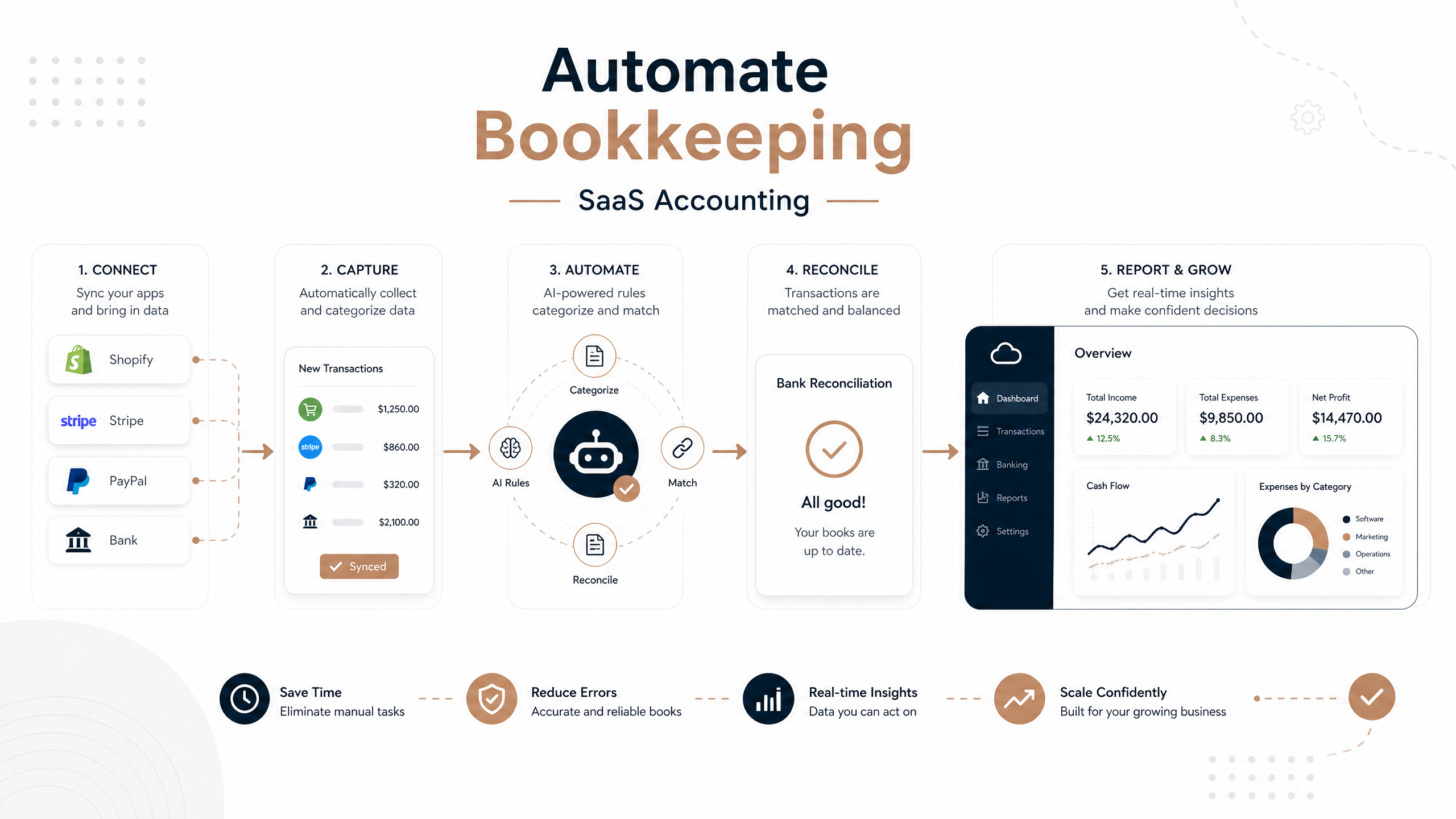
- Bank Reconciliation: Automatic matching of bank transactions with your records.
Automation Capabilities
- Automated Expense Tracking: Tools that can scan receipts, categorize expenses, and integrate with bank feeds.
- Recurring Invoicing and Payments: Set up automatic invoices and payment reminders for subscriptions or regular services.
- Payroll Integration: Seamless integration with payroll services to automate salary processing and tax deductions.
Reporting and Analytics
- Customizable Financial Reports: Generate profit and loss statements, balance sheets, and cash flow reports with ease.
- Budgeting and Forecasting: Tools that help you create budgets and forecast future financial performance.
Integrations and Ecosystem
- CRM Integration: Connect with your customer relationship management system for better sales and billing alignment.
- E-commerce Platform Integration: Essential for online businesses to sync sales data.
- Third-Party App Integrations: Compatibility with other business tools you use (e.g., project management, time tracking).
User Experience and Support
- Intuitive Interface: An easy-to-navigate interface reduces the learning curve and improves user adoption.
- Customer Support: Access to reliable customer support via chat, email, or phone.
- Training Resources: Availability of tutorials, webinars, and documentation.
Step-by-Step Guide to Automating Your Bookkeeping
Implementing automated bookkeeping with SaaS tools can seem daunting, but by following a structured approach, you can ensure a smooth transition and maximize benefits:
Step 1: Assess Your Current Bookkeeping Process
- Identify Pain Points: Pinpoint areas where manual effort is high, errors are frequent, or delays occur.
- Document Existing Workflows: Understand how financial data currently flows through your business.
- Define Your Needs: Determine what you want to achieve with automation (e.g., faster closing, better expense tracking, improved reporting).
Step 2: Research and Select the Right SaaS Accounting Tool
- Compare Features: Based on your needs, compare different SaaS accounting solutions. Look for tools that offer the automation capabilities and integrations you require.
- Read Reviews and Testimonials: Gain insights from other users’ experiences.
- Utilize Free Trials: Most SaaS providers offer free trials. Use them to test the software’s suitability for your business.
Step 3: Plan Your Migration and Setup
- Data Migration Strategy: Plan how you will transfer existing financial data to the new system. Consider historical data and ongoing transactions.
- Chart of Accounts Setup: Customize your chart of accounts to align with your business structure and reporting needs.
- Integrate with Other Systems: Connect your SaaS accounting tool with your bank accounts, payment processors, CRM, and other relevant business applications.
Step 4: Configure Automation Rules and Workflows
- Set Up Bank Feeds: Connect your bank and credit card accounts for automatic transaction imports.
- Automate Expense Categorization: Create rules for automatically categorizing recurring expenses.
- Schedule Recurring Invoices: Set up automated invoicing for regular clients or subscriptions.
- Implement Payment Reminders: Configure automatic reminders for overdue invoices.
- Automate Report Generation: Schedule regular financial reports to be generated and sent to relevant stakeholders.
Step 5: Train Your Team and Monitor Performance
- Provide Comprehensive Training: Ensure all team members who will use the new system are adequately trained.
- Establish Clear Procedures: Document new workflows and responsibilities.
- Monitor and Adjust: Regularly review the performance of your automated system. Make adjustments as needed to optimize efficiency and accuracy.
Conclusion: Embrace the Future of Bookkeeping
Automating your bookkeeping with SaaS accounting tools is a strategic move that can significantly benefit your business. From boosting accuracy and saving time to providing real-time financial insights and enhancing scalability, the advantages are clear. By carefully assessing your needs, selecting the right tool, and implementing a well-planned automation strategy, you can transform your financial management, allowing you to focus more on growth and less on administrative burdens.
Ready to Automate Your Bookkeeping?
Explore the range of SaaS accounting solutions available on SaaSSync Pro today and take the first step towards a more efficient and accurate financial future. Compare features, read reviews, and find the perfect tool to streamline your operations.