How to Automate Your Expense Tracking
How to Automate Your Expense Tracking
In today’s fast-paced business environment, automating expense tracking has become essential for companies aiming to enhance financial accuracy and streamline accounting processes. Manual expense management is not only time-consuming but also prone to errors, which can lead to budget overruns and compliance issues. Fortunately, modern accounting software solutions offer robust automation capabilities designed specifically for B2B organizations. This comprehensive review will explore how to automate your expense tracking effectively and compare leading SaaS solutions that can transform your business accounting workflow.
Why Automate Expense Tracking?
Automating expense tracking brings multiple benefits to businesses, including:
- Increased Accuracy: Reduces manual entry errors and ensures data consistency.
- Time Savings: Frees up finance teams to focus on strategic tasks rather than routine data entry.
- Improved Compliance: Helps maintain audit trails and adhere to company policies and regulatory standards.
- Real-Time Insights: Provides instant access to expense data for better budgeting and forecasting.
Let’s dive into the key features of top accounting software solutions that enable effective expense automation.
Key Features to Look For in Expense Tracking Software
1. Automated Receipt Capture
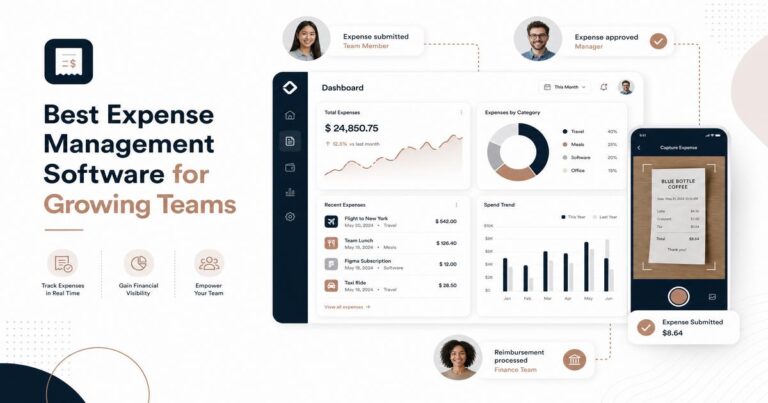
Look for software that supports mobile scanning and OCR (Optical Character Recognition) technology, allowing users to capture receipts instantly and convert them into digital expense records.
2. Integration with Corporate Credit Cards and Bank Accounts
Seamless integration with financial institutions enables automatic importing of transactions, reducing manual input and speeding up reconciliation.
3. Multi-level Approval Workflows
Automated approval processes help enforce spending policies and provide transparency in expense management.
4. Expense Categorization and Reporting
Advanced categorization features allow expenses to be grouped by project, department, or client, while customizable reports facilitate financial analysis and compliance.
5. Cloud-Based Access and Collaboration
Cloud SaaS solutions offer anytime, anywhere access, enabling remote teams to submit and approve expenses without delays.
6. Integration with Accounting and ERP Systems
Look for software that connects easily with your existing accounting or ERP platforms to ensure seamless data flow across your financial systems.
Top SaaS Expense Tracking Solutions
1. Expensify
- Overview: Expensify is a widely adopted expense management platform known for its user-friendly interface and powerful automation features.
- Key Features: SmartScan receipt capture, corporate card reconciliation, multi-level approvals, and direct integration with popular accounting software like QuickBooks and Xero.
- Pros:
- Highly accurate OCR technology
- Mobile app with offline capabilities
- Robust reporting and analytics
- Cons:
- Pricing can be high for larger teams
- Some users report a learning curve for advanced features
2. Zoho Expense
- Overview: Zoho Expense is part of the Zoho suite, offering comprehensive expense automation with tight integration to Zoho Books and other Zoho applications.
- Key Features: Automated expense recording, mileage tracking, policy compliance enforcement, expense approval workflows, and multi-currency support.
- Pros:
- Affordable pricing tiers
- Extensive integration options
- Strong mobile app functionality
- Cons:
- Less intuitive UI compared to competitors
- Customer support can be slow during peak times
3. Certify
- Overview: Certify provides a scalable expense management platform focused on automation and compliance, suitable for medium to large enterprises.
- Key Features: Receipt capture, automated expense reporting, audit-ready compliance tools, and seamless integration with ERP systems like NetSuite and SAP.
- Pros:
- Strong compliance and audit features
- Customizable workflows
- Good customer service and onboarding support
- Cons:
- Interface can feel dated
- Pricing is on the higher side
Pricing Comparison
| Software | Pricing Model | Starting Price | Free Trial |
|---|---|---|---|
| Expensify | Per User, Per Month | $5/user/month (Team plan) | Yes (Free 30-day trial) |
| Zoho Expense | Per User, Per Month | $5/user/month (Standard plan) | Yes (Free 14-day trial) |
| Certify | Custom Pricing | Contact Sales | Yes (Demo available) |
Pros & Cons Summary
Expensify
- Pros: Excellent automation, strong integrations, user-friendly mobile app.
- Cons: Pricing may be prohibitive for large teams, advanced features require training.
Zoho Expense
- Pros: Cost-effective, robust features, good integration with Zoho ecosystem.
- Cons: User interface less polished, occasional support delays.
Certify
- Pros: Scalable for enterprises, strong compliance tools, customizable workflows.
- Cons: Higher price point, dated UI design.
Final Verdict
When it comes to automating your expense tracking, choosing the right SaaS solution depends on your company size, budget, and existing technology stack. Expensify is ideal for businesses seeking a balance of ease-of-use and powerful automation, especially those already using popular accounting platforms. Zoho Expense offers a compelling, budget-friendly choice for companies invested in the Zoho ecosystem or looking for a flexible, scalable solution with multi-currency support. For larger enterprises with complex compliance requirements, Certify provides a robust platform capable of handling advanced workflows and audit readiness.
Each of these platforms significantly reduces manual effort, enhances accuracy, and improves visibility into business expenses. Investing in automated expense tracking software not only streamlines your accounting processes but also empowers your finance team to make smarter financial decisions with real-time insights.
Frequently Asked Questions
What are the key features to look for in automated expense tracking software?
Look for features like real-time expense syncing, receipt scanning, integration with accounting tools, and multi-currency support to ensure efficient and accurate tracking.
How do pricing models typically vary among expense tracking SaaS options?
Pricing usually varies based on user count, number of transactions, and feature access, with plans ranging from free tiers for basic use to premium subscriptions for advanced automation and analytics.
Which expense tracking software is best suited for small businesses versus enterprises?
Small businesses benefit from user-friendly, affordable tools with basic automation, while enterprises require scalable solutions offering advanced controls, multi-user management, and extensive integrations.
To maximize your ROI, consider your unique business needs, test software trials, and evaluate integration capabilities before making a final choice. Automating your expense tracking is a strategic step toward financial efficiency and operational excellence.