How to Secure Your Cloud Storage and Prevent Data Leaks
Introduction
In today’s digital age, cloud storage has become an indispensable tool for individuals and businesses alike. It offers unparalleled convenience, scalability, and accessibility, allowing us to store vast amounts of data without the need for physical infrastructure. However, this convenience comes with inherent risks. The very nature of cloud computing, where data resides on remote servers managed by third-party providers, introduces new security challenges. Data breaches, unauthorized access, and data leaks are growing concerns that can lead to significant financial losses, reputational damage, and legal repercussions. This comprehensive guide will walk you through the essential steps and best practices to secure your cloud storage effectively and prevent data leaks, ensuring your valuable information remains protected.
Understanding Cloud Storage Security Risks
Before diving into prevention, it’s crucial to understand the common security risks associated with cloud storage. These risks can stem from various sources, including human error, malicious attacks, and vulnerabilities in cloud infrastructure [1].
Common Threats to Cloud Data
- Unauthorized Access: Weak access controls, compromised credentials, or insider threats can lead to unauthorized individuals gaining access to sensitive data.
- Data Breaches: Successful cyberattacks can result in large volumes of data being stolen or exposed. This can be due to misconfigurations, software vulnerabilities, or phishing attacks.
- Data Leaks: Unintentional exposure of sensitive information, often due to human error, misconfigured sharing settings, or insecure application development.
- Malware and Ransomware: Cloud storage can be a target for malware, which can encrypt or corrupt data, or ransomware, which demands payment for data recovery.
- Insecure APIs: Application Programming Interfaces (APIs) used to interact with cloud services can be vulnerable if not properly secured, creating entry points for attackers.
- Compliance and Regulatory Risks: Failure to comply with data protection regulations (e.g., GDPR, HIPAA) can lead to hefty fines and legal issues.
Step-by-Step Guide to Securing Your Cloud Storage
Securing your cloud storage requires a multi-layered approach, combining robust technical controls with strong organizational policies. Follow these steps to enhance your cloud data security posture.
Step 1: Choose a Reputable Cloud Service Provider (CSP)
The foundation of secure cloud storage lies with your chosen provider. A reliable CSP invests heavily in security infrastructure, compliance, and best practices [2].
- Due Diligence: Research potential CSPs thoroughly. Look for certifications (e.g., ISO 27001, SOC 2), compliance with industry standards, and a strong track record of security.
- Service Level Agreements (SLAs): Review SLAs carefully to understand the provider’s responsibilities regarding data security, uptime, and incident response.
- Data Residency: Understand where your data will be stored geographically. This is crucial for compliance with data protection laws in your region.
- Encryption Practices: Ensure the CSP offers robust encryption for data at rest and in transit. Verify their key management practices.
Step 2: Implement Strong Access Controls
Controlling who can access your data and what they can do with it is paramount. Weak access controls are a leading cause of data breaches.
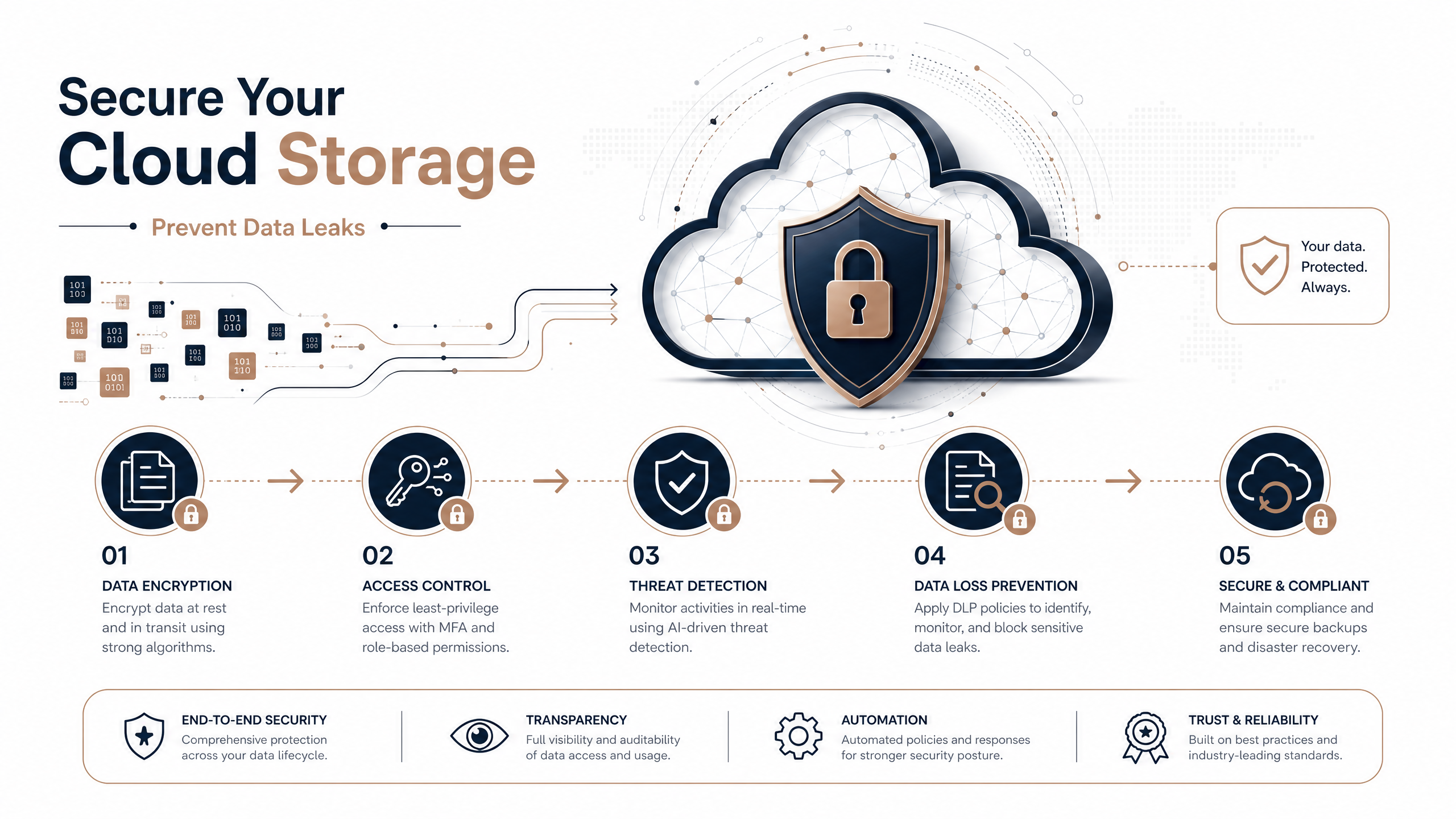
- Strong Passwords and Multi-Factor Authentication (MFA): Enforce complex password policies and mandate MFA for all user accounts. MFA adds an extra layer of security by requiring a second form of verification.
- Least Privilege Principle: Grant users only the minimum necessary permissions to perform their tasks. Regularly review and revoke unnecessary access.
- Role-Based Access Control (RBAC): Utilize RBAC to define roles with specific permissions, making it easier to manage access for groups of users.
- Regular Access Reviews: Periodically audit user access rights to ensure they align with current roles and responsibilities.
Step 3: Encrypt Your Data
Encryption is a fundamental security measure that transforms your data into an unreadable format, protecting it even if unauthorized access occurs [3].
- Encryption at Rest: Ensure your data is encrypted when stored on the CSP’s servers. Most reputable CSPs offer this as a standard feature.
- Encryption in Transit: Protect your data as it travels between your devices and the cloud using protocols like TLS/SSL.
- Client-Side Encryption: For highly sensitive data, consider encrypting it on your local device before uploading it to the cloud. This gives you full control over the encryption keys.
- Key Management: Understand and manage your encryption keys securely. Poor key management can undermine the effectiveness of encryption.
Step 4: Configure Sharing Settings Securely
Improper sharing settings are a common cause of accidental data leaks. Exercise caution when sharing files and folders.
- Limit Public Sharing: Avoid making files or folders publicly accessible unless absolutely necessary. If public sharing is required, ensure the data is non-sensitive.
- Granular Permissions: Use granular sharing permissions to specify who can view, edit, or download shared content.
- Password-Protected Links: When sharing links, use password protection and set expiration dates for added security.
- Regularly Review Shared Content: Periodically audit shared files and folders to ensure that sharing permissions are still appropriate.
Step 5: Monitor and Audit Cloud Activity
Continuous monitoring and auditing are essential for detecting suspicious activity and responding to security incidents promptly.
- Logging and Alerting: Enable comprehensive logging for all cloud activities. Configure alerts for unusual access patterns, failed login attempts, or changes to critical configurations.
- Security Information and Event Management (SIEM): Integrate cloud logs with a SIEM system for centralized security monitoring and analysis.
- Regular Audits: Conduct regular security audits and penetration testing to identify vulnerabilities and ensure compliance.
Step 6: Backup Your Data
While cloud providers offer high availability, it’s still crucial to have your own backup strategy to protect against data loss due to accidental deletion, ransomware, or provider outages.
- Redundant Backups: Store backups in a separate location or with a different provider to ensure data resilience.
- Regular Testing: Periodically test your backup and recovery procedures to ensure they are effective.
- Version Control: Utilize version control for important documents to easily revert to previous versions if data is corrupted or accidentally modified.
Step 7: Educate Your Users
Human error remains a significant factor in data breaches. User education is a critical component of any robust security strategy.
- Security Awareness Training: Provide regular training on cybersecurity best practices, including phishing awareness, password hygiene, and secure sharing habits.
- Policy Enforcement: Clearly communicate and enforce security policies related to cloud storage usage.
- Incident Reporting: Establish clear procedures for users to report suspicious activities or potential security incidents.
Preventing Data Leaks: Best Practices
Beyond general cloud security, specific measures can be taken to prevent data leaks, which often involve unintentional exposure of sensitive information.
- Data Classification: Classify your data based on its sensitivity (e.g., public, internal, confidential, restricted). This helps in applying appropriate security controls.
- Data Loss Prevention (DLP) Solutions: Implement DLP tools that can identify, monitor, and protect sensitive data across your cloud environment. DLP solutions can prevent data from leaving your organization’s control.
- Secure Development Practices: If you develop applications that interact with cloud storage, ensure secure coding practices to prevent vulnerabilities that could lead to data leaks.
- Third-Party Risk Management: If you share data with third-party vendors, ensure they have adequate security measures in place to protect your data.
- Regular Vulnerability Scanning: Continuously scan your cloud environment for misconfigurations and vulnerabilities that could lead to data exposure.
Conclusion
Securing your cloud storage and preventing data leaks is an ongoing process that requires vigilance and a proactive approach. By choosing a reputable cloud provider, implementing strong access controls, encrypting your data, configuring sharing settings securely, monitoring activity, backing up your data, and educating your users, you can significantly reduce your risk exposure. Remember that security is a shared responsibility between you and your cloud provider. By adopting these best practices, you can harness the power of cloud storage with confidence, knowing that your valuable data is well-protected.
References
[1] TierPoint. “What is Cloud Storage Security? Risks & Best Practices to …” https://www.tierpoint.com/blog/cybersecurity/cloud-storage-security/
[2] Microsoft. “11 best practices for securing data in the cloud – Microsoft” https://www.microsoft.com/en-us/security/blog/2023/07/05/11-best-practices-for-securing-data-in-cloud-services/
[3] Fortra. “Data Leak Prevention: Best Practices for Securing Data – Fortra” https://www.fortra.com/blog/data-leak-prevention-best-practices-securing-data