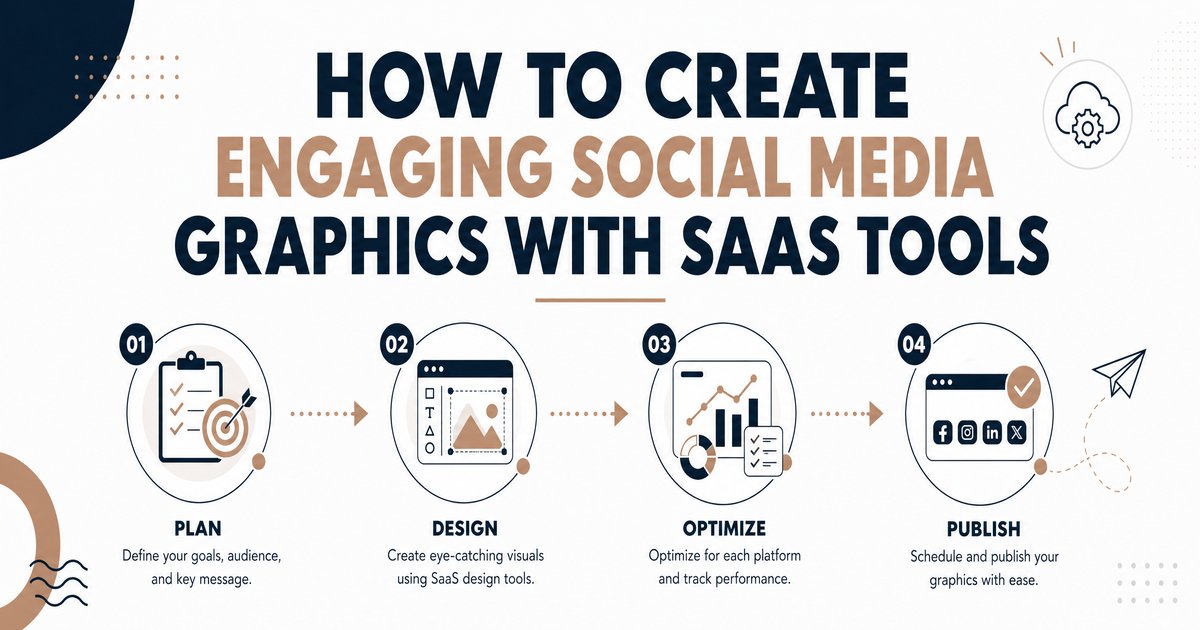
How to Create Engaging Social Media Graphics with SaaS Tools
Introduction
In today’s fast-paced digital landscape, captivating social media graphics are no longer a luxury but a necessity for businesses aiming to stand out. With over 5.17 billion global social media users, the competition for audience attention is fierce. High-quality visual content has been shown to pull in as much as 94% more engagement than plain text posts, making the strategic use of graphics a cornerstone of any robust digital marketing strategy [1]. This article explores how business owners, founders, marketers, and IT professionals can leverage Software as a Service (SaaS) tools to create engaging social media graphics efficiently and effectively, boosting brand recognition, driving engagement, and ultimately enhancing conversion rates.
The importance of social media graphics extends beyond mere aesthetics. These visuals help convey a brand’s message succinctly and memorably, ensuring content stands out in crowded social media channels. Consistent use of graphics helps build brand recognition by up to 80%, fostering trust and reliability among consumers [2]. Furthermore, high-quality social media graphics are powerful tools for boosting conversion rates, with studies showing a 66% increase in conversions compared to lower-quality visuals [2]. This guide will delve into the key features, pricing models, and pros and cons of leading SaaS tools, empowering you to make informed decisions for your social media graphic design needs.
Key Features of Effective Social Media Graphic SaaS Tools
Modern SaaS tools for social media graphic design offer a plethora of features designed to streamline the creation process, even for users without extensive design experience. Understanding these key features is crucial for selecting the right tool that aligns with your business objectives and creative workflow.
User-Friendly Interface and Templates
The most effective tools prioritize ease of use. A drag-and-drop interface, coupled with a vast library of professionally designed templates, allows users to create stunning graphics quickly. These templates often cater to various social media platforms (Instagram, Facebook, LinkedIn, TikTok) and content types (posts, stories, ads), ensuring optimal sizing and visual appeal. Tools like Canva and Adobe Express excel in this area, offering intuitive platforms that simplify complex design tasks [1] [2].
Brand Kit Management
Maintaining brand consistency across all social media channels is paramount for brand recognition and loyalty. SaaS tools that offer brand kit features allow users to store and easily apply brand assets such as logos, color palettes, fonts, and imagery. This ensures that every graphic produced adheres to brand guidelines, reinforcing a cohesive visual identity. Canva Pro and RelayThat are notable for their robust brand kit functionalities, which are particularly beneficial for businesses and agencies managing multiple brands or campaigns [1].
AI-Powered Features
Artificial intelligence (AI) is increasingly integrated into graphic design tools, offering advanced capabilities that enhance creativity and efficiency. Features like AI-powered background removal, one-click resizing for multiple platforms, and AI image/video generation can significantly reduce design time and effort. Canva’s Magic Design™ and Adobe Express’s AI capabilities are examples of how AI is transforming social media graphic creation, enabling users to generate buzzworthy content with minimal input [1] [3].
Collaboration and Workflow Integration
For teams and agencies, collaboration features are indispensable. Tools that support real-time collaboration, cloud-based workflows, and easy sharing of projects facilitate seamless teamwork and ensure visual alignment across channels. Integration with other marketing and social media management platforms further streamlines workflows, allowing for direct publishing or scheduling of graphics. Figma is a prime example of a tool built for collaborative design, making it ideal for agencies managing multiple clients [1].
Stock Media Libraries and Asset Management
Access to a rich library of stock photos, videos, icons, and graphic elements is a significant advantage. This eliminates the need to source external assets, saving time and ensuring legal compliance. Many SaaS tools offer built-in stock media libraries, with some providing royalty-free assets. Effective asset management features also help organize designs and resources, making them easily retrievable for future use [2].
Leading SaaS Tools for Social Media Graphics: Features, Pricing, Pros, and Cons
To help you navigate the crowded market, here’s a detailed look at some of the top SaaS tools for creating engaging social media graphics.
Canva
- Key Features: Drag-and-drop interface, extensive template library, brand kits, AI-powered background removal, one-click resizing, content planner, team collaboration.
- Pricing: Freemium model. Free version with basic features. Canva Pro (for individuals and small teams) and Canva for Teams (for larger organizations) offer advanced features, premium templates, and more storage.
- Pros: Extremely user-friendly, vast template selection, strong collaboration features, comprehensive all-in-one solution for various design needs, mobile app availability [1] [2].
- Cons: Free version has limitations, advanced features require a subscription, can be less powerful for highly complex or custom designs compared to professional-grade software.
Adobe Express
- Key Features: Professional templates, built-in stock photos and fonts, quick video and animated post creation, seamless integration with other Adobe products, AI capabilities.
- Pricing: Freemium model. Free version available. Premium plans offer full access to features, larger asset libraries, and advanced editing tools.
- Pros: Combines professional-grade design with ease of use, excellent for creating quick videos and animated posts, strong branding capabilities, mobile app availability [1] [2].
- Cons: May require some familiarity with the Adobe ecosystem for full utilization, free version can be restrictive, not as comprehensive as full Adobe Creative Suite applications.
Snappa
- Key Features: Designed for speed and simplicity, ready-to-use templates for every platform, packed with royalty-free images, instant sharing to social networks.
- Pricing: Freemium model. Free plan with limited downloads. Paid subscriptions offer unlimited downloads and advanced features.
- Pros: Incredibly fast for creating graphics, very easy to use with no design skills needed, excellent for marketers producing high-volume content, access to a large library of stock photos [1] [2].
- Cons: Fewer advanced design features compared to Canva or Adobe Express, primarily focused on static image creation, limited animation capabilities.
VistaCreate (formerly Crello)
- Key Features: Thousands of templates, strong animation features, motion graphics for social posts, drag-and-drop interface, video backgrounds.
- Pricing: Freemium model. Free plan available. Pro plan offers full access to features and assets.
- Pros: Affordable Canva alternative, excellent for motion-focused designs and animated content, user-friendly interface, good for startups and freelancers [1] [2].
- Cons: May not have as extensive a template library as Canva, some advanced features are locked behind the paid plan.
Figma
- Key Features: Real-time collaboration, cloud-based workflow, vector editing, prototyping capabilities, plugins for extended functionality.
- Pricing: Freemium model. Free starter plan. Paid plans for professional teams and organizations.
- Pros: Ideal for design teams and agencies due to its collaborative nature, powerful for creating detailed and custom designs, excellent for maintaining visual alignment across channels [1].
- Cons: Steeper learning curve for beginners, primarily a design tool rather than a social media content creation tool, may require integration with other tools for direct social media publishing.
Piktochart
- Key Features: Data-driven visuals, easy chart and infographic creation, templates for reports and presentations.
- Pricing: Freemium model. Free plan with limited features. Paid plans offer more templates, higher resolution downloads, and brand kit features.
- Pros: Excellent for creating infographics and data visualizations, ideal for educational and B2B brands, helps in creating content that earns more backlinks [1].
- Cons: More specialized for infographics and less versatile for general social media graphics, template library is focused on data visualization.
Choosing the Right SaaS Tool for Your Business
Selecting the optimal SaaS tool for your social media graphic design needs depends on several factors, including your team’s skill level, budget, and specific content requirements.
Consider Your Design Skill Level
For beginners or marketers without extensive design experience, tools like Canva, Adobe Express, and Snappa offer intuitive interfaces and abundant templates that simplify the design process. These tools are designed to be accessible, allowing users to create professional-looking graphics with minimal learning curve. For design teams or professionals seeking more control and collaborative features, Figma might be a more suitable choice, despite its steeper learning curve [1].
Evaluate Your Content Needs
Do you primarily need static images, or do you require animated posts and videos? Tools like VistaCreate and Adobe Express excel in motion graphics, while Piktochart is specialized for data-driven visuals and infographics. If your strategy involves a mix of content types, an all-in-one solution like Canva might be the most versatile option [1].
Budget and Scalability
Many SaaS tools offer freemium models, allowing you to start with basic features before committing to a paid plan. Evaluate the pricing tiers and consider the long-term cost-effectiveness. For businesses with growing needs, ensure the chosen tool can scale with your operations, offering advanced features, increased storage, and team management capabilities as required. Some tools, like Affinity Studio, offer a one-time purchase model, which can be cost-effective for professional designers in the long run [1].
Brand Consistency Requirements
If maintaining strict brand consistency across multiple channels is a priority, look for tools with robust brand kit management features. These allow you to pre-define and easily apply your brand’s colors, fonts, and logos, ensuring every graphic aligns with your visual identity. Canva Pro and RelayThat are particularly strong in this aspect [1].
Conclusion
In the dynamic world of social media, engaging graphics are indispensable for capturing attention, fostering engagement, and driving business growth. SaaS tools have democratized graphic design, making it accessible to business owners, marketers, and IT professionals regardless of their design expertise. By carefully considering key features such as user-friendly interfaces, brand kit management, AI-powered capabilities, and collaboration tools, businesses can select the right platform to elevate their social media presence.
Tools like Canva, Adobe Express, Snappa, VistaCreate, Figma, and Piktochart each offer unique strengths, catering to diverse needs and skill levels. Investing in the right SaaS solution not only streamlines the graphic creation process but also empowers your brand to communicate effectively, build stronger connections with your audience, and achieve measurable marketing success. Embrace the power of these innovative tools to transform your social media strategy and unlock new opportunities for engagement and growth.
References
- [1] Synergi Digital. (2026, January 5). Top 10 Tools for Social Media Graphic Design in 2026. Retrieved from https://www.synergidigital.com/blogs/top-10-tools-for-social-media-graphic-design/
- [2] Slate. (2026, May 28). Top 7 Tools to Create Stunning Social Media Graphics. Retrieved from https://slateteams.com/blog/social-media-graphic-design-tools
- [3] Canva. Create scroll-stopping Social Media content, powered by AI. Retrieved from https://www.canva.com/social-media/