Descript vs. Kapwing: AI Video Editing Compared for Business and Marketing Professionals
Introduction
In the rapidly evolving landscape of digital content creation, video has emerged as the dominant medium for communication, marketing, and education. As the demand for high-quality video content surges, creators and businesses are constantly seeking tools that can streamline their production workflows without compromising on quality. Two platforms that have consistently stood out in this arena are Descript and Kapwing. Both leverage artificial intelligence to simplify the video editing process, yet they approach the task from fundamentally different angles.
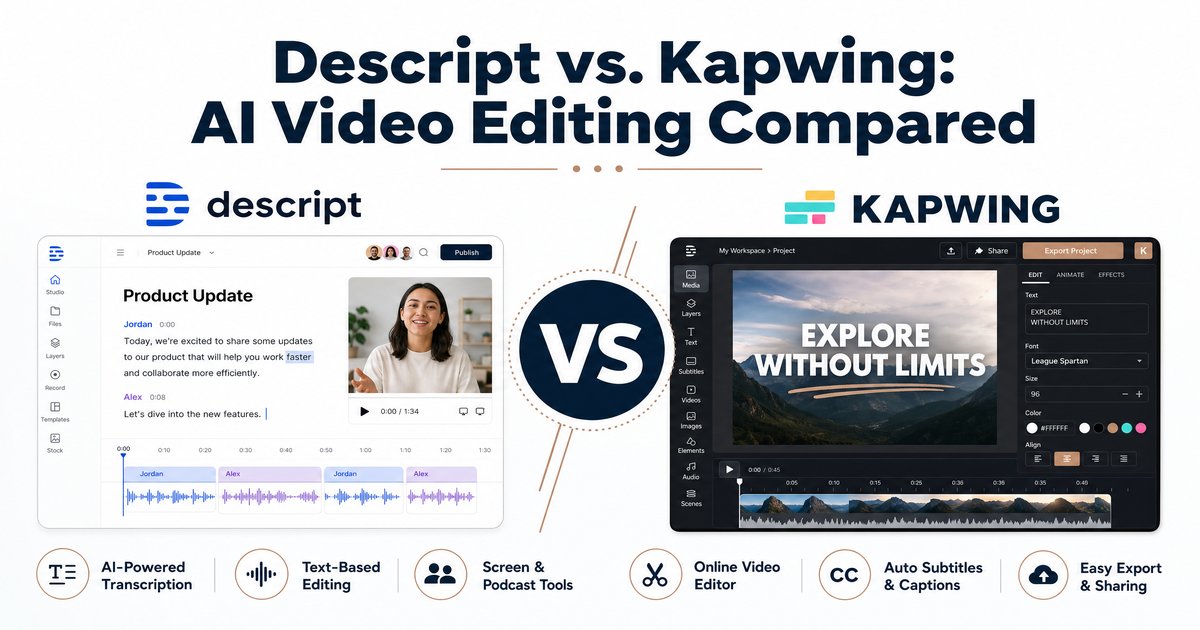
Descript has revolutionized the industry with its text-based editing paradigm, treating video and audio manipulation much like editing a word document. On the other hand, Kapwing offers a robust, browser-based timeline editor that excels in collaborative environments and rapid social media content creation. This comprehensive comparison will delve into the features, pricing, pros, and cons of Descript and Kapwing, helping business owners, founders, marketers, and IT professionals determine which AI video editing software best aligns with their specific needs.
Key Features Comparison
Descript: The Text-Based Powerhouse
Descript’s standout feature is its innovative approach to editing. By automatically transcribing uploaded media, it allows users to edit video and audio by simply modifying the text. This is particularly advantageous for dialogue-heavy content such as podcasts, interviews, and webinars.
- Transcript-Based Editing: Delete a word in the transcript, and the corresponding video and audio are automatically cut. This drastically reduces the time spent scrubbing through timelines.
- Overdub (AI Voice Cloning): If a speaker misspeaks or forgets a line, users can type the correction, and Descript’s AI will generate the audio in the speaker’s voice, seamlessly blending it into the track.
- Studio Sound: With a single click, this AI feature removes background noise and enhances voice clarity, making recordings sound as if they were produced in a professional studio.
- Filler Word Removal: Descript automatically identifies and removes filler words like “um” and “uh,” instantly polishing the audio track.
Kapwing: The Collaborative Cloud Editor
Kapwing is designed for speed and accessibility. Operating entirely within the browser, it eliminates the need for software installations and high-end hardware, making it an ideal choice for distributed teams and social media managers.
- Intuitive Timeline Interface: Kapwing provides a familiar drag-and-drop timeline that is easy for beginners to grasp while offering enough depth for more complex edits.
- Real-Time Collaboration: Multiple users can work on the same project simultaneously, much like Google Docs, streamlining the review and approval process.
- Smart Cut and Auto-Subtitles: Kapwing’s AI can automatically remove silences and generate accurate subtitles, which are crucial for social media platforms where videos are often watched without sound.
- Extensive Template Library: The platform offers a vast array of templates optimized for various social media formats, enabling rapid content generation.
Pricing Structures
Understanding the cost implications is vital for businesses scaling their content production. Both platforms offer tiered pricing models to accommodate different user needs.
Descript Pricing
Descript provides a free tier that is excellent for testing the waters, offering 1 hour of transcription and basic editing features. For more serious users, the paid plans are structured as follows:
- Hobbyist/Creator Plan: Starting at $15 to $16 per month (billed annually), this plan includes 10 hours of transcription, watermark-free 4K exports, and access to advanced AI features like Overdub and filler word removal.
- Pro/Business Plan: Priced around $30 to $50 per month, this tier offers 30 hours of transcription, unlimited use of AI effects, and enhanced collaboration tools suitable for professional editors and small teams.
- Enterprise: Custom pricing is available for large organizations requiring dedicated support, SSO, and advanced security features.
Kapwing Pricing
Kapwing also offers a free version, which includes basic features but limits exports to 720p with a watermark and a maximum length of 1 minute.
- Pro Plan: At $16 per month (billed annually), users get unlimited watermark-free exports, 4K resolution, 6GB file uploads, and access to premium tools like auto-subtitling (up to 1,000 minutes/month) and custom fonts.
- Business Plan: For $50 per month (billed annually), teams gain advanced features such as custom voice clones, lip-sync capabilities, and increased limits for AI tools.
- Enterprise: Similar to Descript, Kapwing offers custom enterprise solutions with priority support and advanced administrative controls.
Pros and Cons
Descript
Pros:
- Revolutionary text-based editing significantly speeds up workflow for spoken content.
- Exceptional audio enhancement tools like Studio Sound.
- Innovative AI features such as Overdub for easy corrections.
- All-in-one solution for recording, transcribing, and editing.
Cons:
- The unique editing paradigm requires a learning curve for those accustomed to traditional timelines.
- Less suited for highly visual, non-dialogue-centric videos.
- Transcription accuracy can struggle with heavy accents or specialized jargon, requiring manual cleanup.
Kapwing
Pros:
- Highly accessible browser-based platform with no installation required.
- Excellent real-time collaboration features for team projects.
- Familiar and intuitive timeline interface.
- Strong focus on social media with numerous templates and easy resizing options.
Cons:
- Lacks advanced audio editing and voice cloning features found in Descript.
- Performance can occasionally lag on complex projects due to browser limitations.
- Free plan is quite restrictive regarding export length and quality.
Conclusion: Which Should You Choose?
The choice between Descript and Kapwing ultimately hinges on your specific content strategy and workflow requirements. If your primary focus is on dialogue-heavy content—such as podcasts, interviews, educational courses, or talking-head YouTube videos—Descript is the clear winner. Its text-based editing and powerful audio enhancement tools will save you countless hours and elevate the professional quality of your output.
Conversely, if your team is focused on producing high volumes of short-form social media content, promotional clips, or highly visual videos, Kapwing is the superior choice. Its intuitive timeline, robust collaboration features, and extensive template library make it incredibly efficient for marketing teams and social media managers who need to iterate quickly across multiple platforms.
Both platforms represent the cutting edge of AI-assisted video editing. By evaluating your team’s primary use cases against the strengths of each tool, you can make an informed decision that will significantly enhance your content creation capabilities in 2026 and beyond.