How to Use AI to Automate Your SaaS Customer Support
In today’s fast-paced digital landscape, customer support is no longer just a cost center; it’s a critical differentiator that can make or break a SaaS business. As customer expectations soar, fueled by instant gratification and personalized experiences, traditional support models often struggle to keep pace. This is where Artificial Intelligence (AI) steps in, offering a transformative approach to automating and enhancing customer support operations. By leveraging AI, SaaS companies can not only reduce operational costs but also significantly improve response times, personalize interactions, and provide 24/7 assistance, ultimately leading to higher customer satisfaction and retention.
This comprehensive guide will delve into the practical aspects of integrating AI into your SaaS customer support strategy. We’ll explore the various AI technologies available, outline a step-by-step process for implementation, discuss best practices for maximizing AI’s potential, and address common challenges. Whether you’re looking to streamline routine inquiries, provide instant self-service options, or empower your human agents with intelligent tools, this guide will equip you with the knowledge and actionable insights to effectively use AI to automate your SaaS customer support.
Understanding AI in Customer Support
Before diving into implementation, it’s crucial to understand the different facets of AI that can be applied to customer support. AI is not a monolithic technology; rather, it encompasses several sub-fields, each offering unique capabilities to enhance the customer experience and streamline operations.
Key AI Technologies for SaaS Customer Support
- Chatbots and Virtual Assistants: These are perhaps the most visible applications of AI in customer support. Powered by Natural Language Processing (NLP), chatbots can understand and respond to customer queries in real-time, handling routine questions, providing instant answers, and guiding users through troubleshooting steps. Advanced virtual assistants can even perform complex tasks like booking appointments or processing refunds.
- Natural Language Processing (NLP): NLP is the backbone of many AI customer support tools. It enables machines to understand, interpret, and generate human language. In customer support, NLP is used for sentiment analysis (understanding customer emotions), topic modeling (identifying common issues), and text summarization (condensing long conversations for agents).
- Machine Learning (ML): ML algorithms allow systems to learn from data without explicit programming. In customer support, ML is used to predict customer churn, recommend personalized solutions, route tickets to the most appropriate agent, and identify patterns in customer feedback to improve services proactively.
- Robotic Process Automation (RPA): While not strictly AI, RPA often complements AI solutions by automating repetitive, rule-based tasks. This can include data entry, updating customer records, or processing simple requests, freeing up human agents to focus on more complex and empathetic interactions.
- Predictive Analytics: By analyzing historical data, AI-powered predictive analytics can anticipate customer needs and potential issues before they arise. This allows SaaS companies to offer proactive support, addressing problems before they impact the customer experience.
Step-by-Step Guide to Implementing AI in SaaS Customer Support
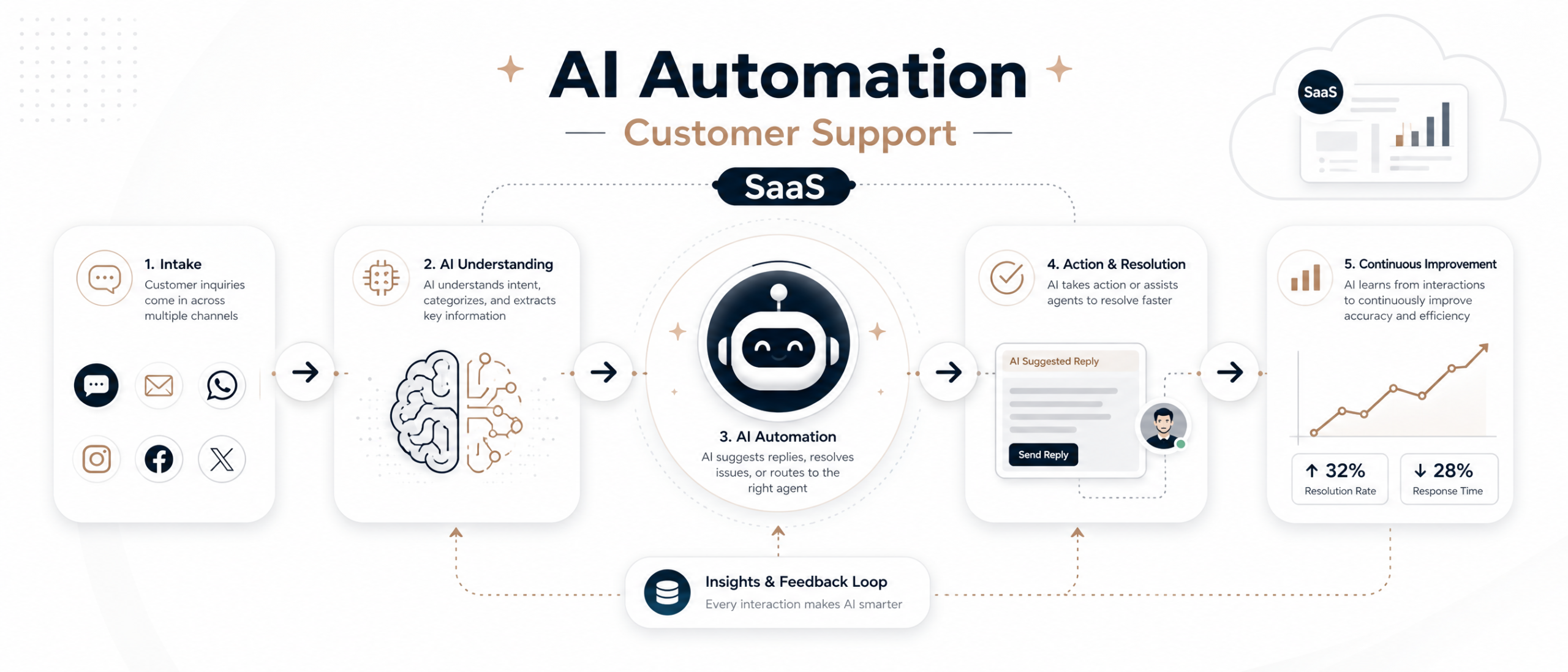
Implementing AI in your customer support operations requires a strategic approach. Here’s a step-by-step guide to help you navigate the process effectively:
Step 1: Define Your Goals and Identify Use Cases
- Clarify Objectives: What do you aim to achieve with AI? Is it reducing response times, improving customer satisfaction, cutting costs, or freeing up agents for complex issues? Clear objectives will guide your implementation.
- Identify Pain Points: Analyze your current customer support operations to pinpoint areas where AI can have the most impact. Common pain points include high volumes of repetitive questions, long wait times, or agent burnout.
- Prioritize Use Cases: Start with high-impact, low-complexity use cases. For example, automating FAQs with a chatbot is often a good starting point before tackling more intricate tasks.
Step 2: Data Collection and Preparation
- Gather Historical Data: AI models learn from data. Collect historical customer interactions, chat logs, email transcripts, and FAQ documents. The more relevant and diverse your data, the better your AI will perform.
- Clean and Structure Data: Raw data is often messy. Invest time in cleaning, labeling, and structuring your data. This might involve removing personally identifiable information (PII), correcting grammatical errors, and categorizing inquiries.
- Ensure Data Privacy and Security: Adhere to data privacy regulations (e.g., GDPR, CCPA) and ensure robust security measures are in place to protect sensitive customer information.
Step 3: Choose the Right AI Tools and Platforms
- Evaluate AI Solutions: Research and compare various AI customer support platforms and tools. Consider factors like ease of integration, scalability, customization options, and vendor support.
- Consider Build vs. Buy: Decide whether to build AI solutions in-house or integrate off-the-shelf platforms. For most SaaS companies, especially those without dedicated AI teams, leveraging existing solutions is often more efficient.
- Look for Integration Capabilities: Ensure the chosen AI tools can seamlessly integrate with your existing CRM, helpdesk software, and other business systems to create a unified support ecosystem.
Step 4: Design and Train Your AI Models
- Develop Conversation Flows (for Chatbots): Design intuitive and effective conversation flows for chatbots. Map out common customer journeys and anticipate potential questions and responses.
- Train AI Models: Use your prepared data to train your AI models. This iterative process involves feeding data to the model, evaluating its performance, and making adjustments to improve accuracy and relevance.
- Iterate and Refine: AI model training is not a one-time event. Continuously monitor performance, gather feedback, and retrain models with new data to ensure they remain effective and up-to-date.
Step 5: Integrate and Deploy
- Pilot Program: Before a full-scale rollout, implement your AI solution in a pilot program with a small group of customers or agents. This allows you to identify and resolve issues in a controlled environment.
- Seamless Integration: Integrate the AI tools into your customer-facing channels (website, app, social media) and agent workflows. Ensure a smooth handover between AI and human agents when necessary.
- Monitor Performance: Continuously monitor key performance indicators (KPIs) such as resolution rates, response times, customer satisfaction scores, and agent efficiency to assess the impact of AI.
Step 6: Continuous Optimization and Human-AI Collaboration
- Feedback Loops: Establish feedback mechanisms from both customers and agents to identify areas for improvement. Use this feedback to refine AI models and processes.
- Empower Human Agents: Position AI as a tool to augment, not replace, human agents. Provide agents with training on how to effectively collaborate with AI, leveraging its capabilities to enhance their own performance.
- Stay Updated: The AI landscape is constantly evolving. Stay informed about new advancements and regularly evaluate how emerging technologies can further enhance your customer support operations.
Best Practices for AI-Powered Customer Support
To truly harness the power of AI in your SaaS customer support, consider these best practices:
Start Small and Scale Gradually
- Don’t try to automate everything at once. Begin with specific, well-defined use cases that offer clear benefits, such as automating FAQs or handling simple password resets. As you gain experience and data, gradually expand AI’s scope to more complex interactions.
Maintain a Human Touch
- AI should augment, not replace, human interaction. Ensure there’s always a seamless escalation path to a human agent when AI cannot resolve an issue or when a customer prefers to speak with a person. Human agents are crucial for empathetic, complex, and sensitive interactions.
Personalize the Experience
- Leverage AI to personalize customer interactions. Use historical data to understand customer preferences, past issues, and product usage. This allows AI to offer more relevant solutions and recommendations, enhancing the overall customer experience.
Continuously Monitor and Optimize
- AI models are not set-it-and-forget-it solutions. Regularly monitor their performance, analyze customer feedback, and identify areas for improvement. Use A/B testing to compare different AI responses and optimize for better outcomes.
Educate Your Customers and Agents
- Clearly communicate to your customers when they are interacting with AI. Manage expectations about AI’s capabilities. Equally important, train your human agents on how to effectively collaborate with AI tools, understanding their strengths and limitations.
Focus on Data Quality
- The effectiveness of your AI solution is directly proportional to the quality of your data. Invest in robust data collection, cleaning, and labeling processes. Poor data will lead to poor AI performance.
Conclusion
The integration of AI into SaaS customer support is no longer a futuristic concept but a present-day necessity for businesses aiming to stay competitive and customer-centric. By strategically implementing AI technologies, SaaS companies can achieve significant improvements in efficiency, cost-effectiveness, and, most importantly, customer satisfaction. From automating routine inquiries with chatbots to empowering human agents with predictive analytics, AI offers a versatile toolkit to transform your support operations.
However, successful AI adoption hinges on a clear understanding of its capabilities, a meticulous approach to data management, and a commitment to continuous optimization. Remember, AI is a powerful assistant, designed to augment human potential, not replace it. By embracing a human-AI collaborative model, SaaS businesses can build a resilient, responsive, and highly personalized customer support ecosystem that not only meets but exceeds the evolving expectations of today’s digital consumers.
Ready to Transform Your SaaS Customer Support?
Explore SaaSSync Pro for in-depth reviews and comparisons of leading AI-powered customer support solutions. Find the perfect tools to automate your operations, enhance customer experience, and drive business growth.