How to Secure Your SaaS Stack with Single Sign-On (SSO)
Introduction
In today’s rapidly evolving digital landscape, businesses increasingly rely on a diverse array of Software as a Service (SaaS) applications to manage operations, enhance productivity, and drive growth. While SaaS offers unparalleled flexibility and scalability, it also introduces complex security challenges. A fragmented approach to user authentication across multiple platforms can lead to security vulnerabilities, increased administrative overhead, and a poor user experience. This is where Single Sign-On (SSO) emerges as a critical solution, offering a streamlined and robust method for securing your entire SaaS stack.
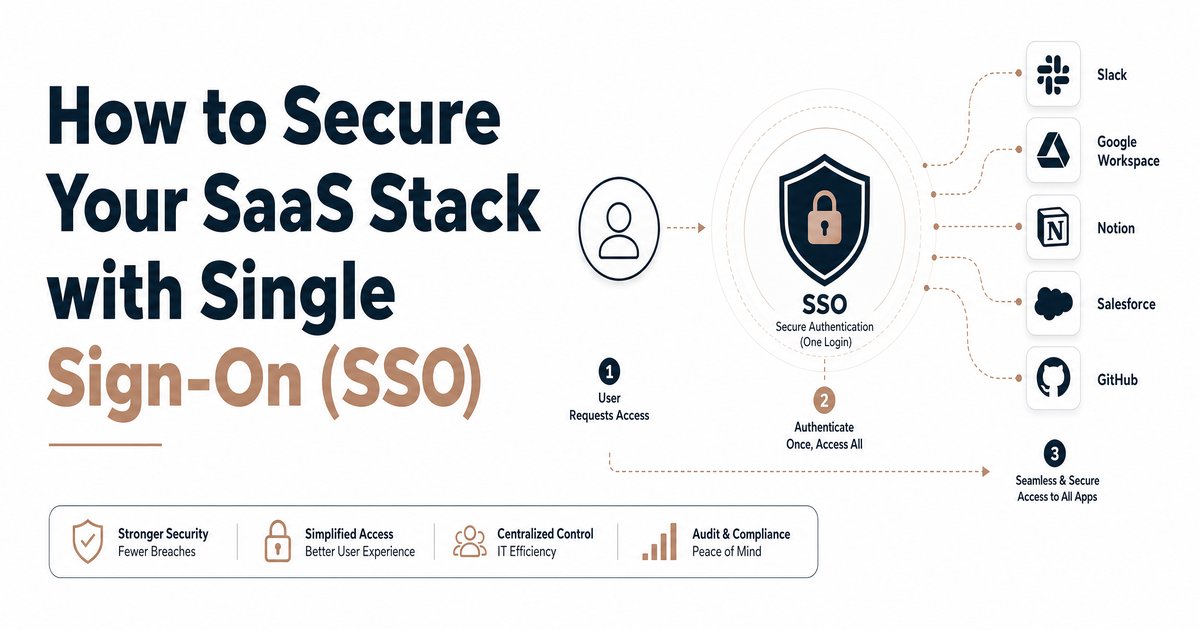
SSO is an authentication scheme that allows a user to log in with a single ID and password to gain access to multiple related, yet independent, software systems. Instead of remembering and managing numerous credentials for each SaaS application, users authenticate once with an identity provider (IdP) and are then automatically granted access to all authorized services. This not only simplifies the user experience but significantly bolsters the overall security posture of an organization by centralizing identity management and reducing the attack surface.
This article will delve into the intricacies of implementing SSO for your SaaS stack, exploring its key features, benefits, potential drawbacks, and considerations for various business types. Whether you are a business owner, founder, marketer, or IT professional, understanding and adopting SSO is paramount to safeguarding your digital assets and ensuring operational efficiency in the cloud-first era.
Key Features of Single Sign-On (SSO)
SSO solutions are built upon several fundamental features that collectively contribute to their effectiveness in enhancing security and user convenience. Understanding these features is crucial for selecting and implementing the right SSO solution for your organization.
Centralized Identity Management
At its core, SSO provides a centralized identity management system. Instead of each SaaS application maintaining its own user directory, SSO integrates with a single identity provider (IdP) such as Okta, Azure Active Directory, or Google Workspace. This IdP acts as the authoritative source for user identities and authentication. When a user attempts to access a SaaS application, the application redirects the authentication request to the IdP. Upon successful authentication, the IdP issues a security token, which the application then uses to grant access. This centralization simplifies user provisioning, de-provisioning, and password management, ensuring consistency across all integrated services.
Multi-Factor Authentication (MFA) Integration
SSO solutions seamlessly integrate with Multi-Factor Authentication (MFA), adding an extra layer of security beyond just a password. MFA requires users to provide two or more verification factors to gain access to a resource, such as a password (something you know), a fingerprint (something you are), or a code from a mobile app (something you have). By enforcing MFA at the IdP level, organizations can ensure that all SaaS applications protected by SSO benefit from this enhanced security, significantly reducing the risk of unauthorized access even if a password is compromised.
User Provisioning and De-provisioning
Effective SSO solutions offer robust capabilities for user provisioning and de-provisioning. This means that when a new employee joins the company, their access to all necessary SaaS applications can be automatically provisioned through the IdP. Conversely, when an employee leaves, their access can be instantly revoked across all applications with a single action. This automation is critical for maintaining security, especially in larger organizations, as it prevents former employees from retaining access to sensitive data and reduces manual administrative tasks.
Audit Trails and Reporting
SSO platforms provide comprehensive audit trails and reporting features. Every login attempt, successful or failed, along with user activity across integrated applications, is logged. This provides valuable insights into user behavior, helps identify potential security threats, and ensures compliance with regulatory requirements. Detailed reports can be generated to monitor access patterns, track application usage, and demonstrate adherence to security policies.
Standards-Based Protocols
SSO relies on industry-standard protocols to facilitate secure communication between the IdP and service providers (SaaS applications). The most common protocols include:
- SAML (Security Assertion Markup Language): An XML-based standard for exchanging authentication and authorization data between an identity provider and a service provider. It is widely used for web-based SSO.
- OAuth (Open Authorization): An open standard for access delegation, commonly used as a way for internet users to grant websites or applications access to their information on other websites without giving them their passwords.
- OpenID Connect (OIDC): A simple identity layer on top of the OAuth 2.0 protocol. It allows clients to verify the identity of the end-user based on the authentication performed by an authorization server, as well as to obtain basic profile information about the end-user in an interoperable and REST-like manner.
Benefits of Implementing SSO
The adoption of SSO brings a multitude of benefits to businesses, impacting security, user experience, and operational efficiency.
Enhanced Security Posture
By centralizing authentication and integrating with MFA, SSO significantly enhances an organization’s security posture. It reduces the risk of password-related breaches, such as phishing attacks and weak password usage. With fewer passwords to remember, users are less likely to reuse simple passwords or write them down, thereby strengthening overall security. Centralized control also means that security policies, such as password complexity and MFA requirements, can be consistently enforced across all applications.
Improved User Experience and Productivity
SSO dramatically improves the user experience by eliminating the need for multiple logins. Users can access all their necessary applications with a single set of credentials, saving time and reducing frustration. This seamless access leads to increased productivity, as employees spend less time managing passwords and more time focusing on their core tasks.
Reduced IT Help Desk Costs
Password-related issues are a significant burden on IT help desks. SSO reduces IT help desk costs by minimizing password reset requests. With a single login and centralized management, users are less likely to forget their credentials, and IT teams can spend less time on routine password support, freeing them up for more strategic initiatives.
Streamlined Compliance and Auditability
For businesses operating under strict regulatory frameworks, SSO streamlines compliance and auditability. The comprehensive audit trails and reporting features provided by SSO solutions make it easier to demonstrate adherence to security policies and regulatory requirements like GDPR, HIPAA, or SOC 2. Centralized logs simplify the process of tracking user access and activity, which is crucial during security audits.
Potential Drawbacks and Considerations
While SSO offers numerous advantages, it’s important to be aware of potential drawbacks and considerations before implementation.
Single Point of Failure
The primary concern with SSO is the single point of failure. If the identity provider (IdP) goes down, users may lose access to all integrated SaaS applications. Organizations must ensure their IdP has high availability, robust disaster recovery plans, and redundant systems to mitigate this risk. It’s also crucial to have a contingency plan for accessing critical applications in the event of an IdP outage.
Implementation Complexity
Implementing SSO can involve a certain degree of implementation complexity, especially for organizations with a large number of legacy applications or highly customized environments. Integrating each SaaS application with the IdP requires configuration and testing. While many modern SaaS applications offer out-of-the-box SSO integrations, older or niche applications may require more effort or custom development.
Cost of Implementation
There is a cost associated with implementing SSO, which includes licensing fees for the IdP, potential consulting services for integration, and ongoing maintenance. While the long-term benefits often outweigh these costs, businesses, especially smaller ones, need to budget accordingly and consider the return on investment.
Choosing the Right SSO Solution
Selecting the appropriate SSO solution involves evaluating several factors to align with your business needs and security requirements.
- Compatibility: Ensure the SSO solution is compatible with your existing SaaS applications and identity stores (e.g., Active Directory, LDAP).
- Security Features: Look for robust security features, including strong MFA options, adaptive authentication, and threat detection capabilities.
- Scalability: Choose a solution that can scale with your organization’s growth and increasing number of users and applications.
- Ease of Use and Management: Opt for a solution with an intuitive interface for both administrators and end-users, simplifying management and reducing training overhead.
- Vendor Support and Reputation: Consider the vendor’s reputation, customer support, and commitment to security and ongoing development.
Conclusion
Single Sign-On is no longer a luxury but a necessity for businesses operating in the cloud. By centralizing identity management, enhancing security with MFA, and streamlining user access, SSO provides a powerful solution to the complexities of securing a modern SaaS stack. While implementation requires careful planning and consideration of potential drawbacks, the benefits in terms of enhanced security, improved user experience, reduced IT costs, and simplified compliance are undeniable.
For business owners, founders, marketers, and IT professionals, embracing SSO is a strategic move towards building a more secure, efficient, and productive digital environment. It empowers your team to work seamlessly across applications while providing the robust protection needed to safeguard your valuable data and maintain trust in an increasingly interconnected world. The investment in SSO is an investment in the future resilience and success of your SaaS-driven enterprise.