How to Optimize Your WordPress Site for Core Web Vitals: A Comprehensive Guide
Introduction
In today’s competitive digital landscape, a fast and responsive website is no longer a luxury but a necessity. Google’s Core Web Vitals (CWV) are a set of metrics that measure real-world user experience, directly impacting search engine rankings and overall site performance. For WordPress users, optimizing for these vitals is crucial to ensure visibility, user engagement, and ultimately, business success. This comprehensive guide will delve into the intricacies of Core Web Vitals, explain their significance for WordPress sites, and provide actionable strategies and tools to help business owners, founders, marketers, and IT professionals enhance their site’s performance.
Understanding Core Web Vitals
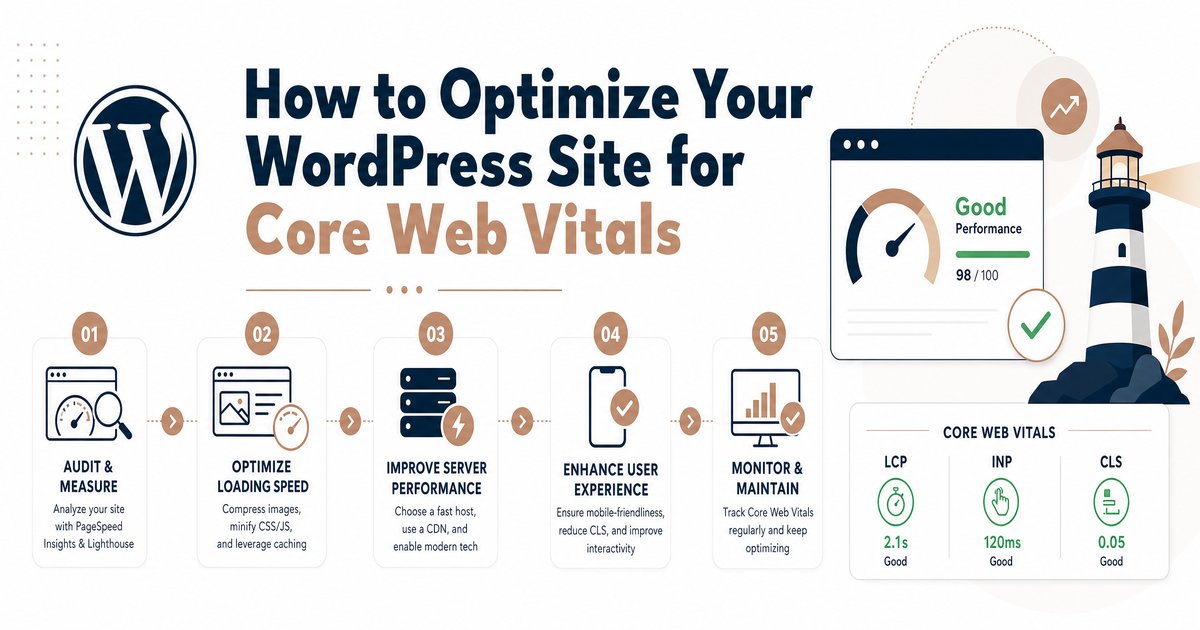
Core Web Vitals are a set of three specific metrics that Google considers essential for a good user experience on the web. These metrics are Largest Contentful Paint (LCP), Interaction to Next Paint (INP), and Cumulative Layout Shift (CLS). Each plays a distinct role in evaluating different aspects of user experience:
- Largest Contentful Paint (LCP): This metric measures loading performance by reporting the render time of the largest image or text block visible within the viewport. An ideal LCP score is 2.5 seconds or less [2].
- Interaction to Next Paint (INP): Assessing responsiveness, INP measures the time from when a user first interacts with a page (e.g., clicks a link, taps a button) to when the browser is able to respond to that interaction. A good INP score is 200 milliseconds or less [2]. This metric replaced First Input Delay (FID) in March 2024 [4].
- Cumulative Layout Shift (CLS): This metric evaluates visual stability by quantifying the unexpected shifting of visual page content. An ideal CLS score is 0.1 or less [2].
These metrics are vital because they directly correlate with user satisfaction, retention, and conversion rates. Google uses Core Web Vitals as a ranking factor, meaning sites with better scores are more likely to appear higher in search results [3].
Key Features and Optimization Strategies
Optimizing a WordPress site for Core Web Vitals involves a multi-faceted approach, addressing each metric individually. Below are detailed strategies for improving LCP, INP, and CLS.
Improving Largest Contentful Paint (LCP)
LCP focuses on how quickly the main content of your page loads. To enhance LCP, it is crucial to optimize images and media by compressing them using tools like TinyPNG or WordPress plugins such as Smush, and considering next-gen formats like WebP. Implementing lazy loading for images and videos not immediately visible in the viewport also significantly helps [1]. Furthermore, effective caching stores static versions of pages and assets, reducing server load and speeding up delivery. Utilizing robust caching plugins like WP Rocket or leveraging server-level caching from your hosting provider is recommended [2]. Another key strategy is to minimize render-blocking resources by minifying CSS, JavaScript, and HTML files, and deferring non-critical JavaScript and asynchronously loading CSS to ensure essential content renders first [1]. Finally, upgrading to a fast and reliable hosting provider is fundamental, as managed WordPress hosting solutions often include optimized server configurations, CDNs, and advanced caching, thereby improving server response times [1]. Using a Content Delivery Network (CDN) further distributes your site’s static assets globally, serving content from the nearest server to the user and reducing latency [1].
Enhancing Interaction to Next Paint (INP)
INP measures your site’s responsiveness to user interactions. To improve INP, focus on optimizing JavaScript execution by deferring non-essential scripts and streamlining existing code; plugins like Async JavaScript can assist [1]. A fast server response time is also crucial for INP, emphasizing the importance of a high-performance hosting provider and database optimization [1]. It is also important to minimize third-party scripts from ads, analytics, or other services, loading them asynchronously or limiting their use to reduce their impact on interactivity [1]. Regularly optimizing your database with tools like WP-Optimize helps clean up redundant data and optimize tables for efficiency [1]. Lastly, choosing lightweight themes and plugins built with performance in mind can prevent unnecessary bloat and improve responsiveness [1].
Reducing Cumulative Layout Shift (CLS)
CLS focuses on visual stability, preventing unexpected content shifts. To improve CLS, always specify image and video dimensions by including width and height attributes for these elements. This reserves necessary space on the page, preventing layout shifts as they load [1]. For web fonts, use font-display: swap; in your CSS to ensure a smooth transition by displaying fallback fonts until custom fonts are loaded, and preload critical fonts to prioritize their loading [1]. Finally, manage dynamic content carefully, ensuring that elements like ads or embedded content do not cause unexpected layout changes by reserving space for them or loading them in a non-disruptive manner [1].
Tools for Measuring and Improving Core Web Vitals
Several essential tools are available to help assess and enhance your WordPress site’s Core Web Vitals. Google PageSpeed Insights provides detailed reports on Core Web Vitals metrics and offers actionable recommendations for improvement [1]. For a deeper analysis, Google Lighthouse, integrated into Chrome DevTools, offers insights into performance, accessibility, and best practices, which is useful for debugging specific issues [1]. Google Search Console provides a site-wide overview of performance through its dedicated Core Web Vitals report, highlighting pages that require attention [1]. The Chrome User Experience Report (CrUX) offers real-world user data on Core Web Vitals, accessible via BigQuery or Looker Studio [1]. Additionally, numerous WordPress plugins are specifically designed for Core Web Vitals optimization, including caching plugins (e.g., WP Rocket), image optimization plugins (e.g., Smush), and comprehensive performance suites (e.g., NitroPack) [2, 3].
Pricing Considerations for Optimization Tools and Services
The cost associated with optimizing a WordPress site for Core Web Vitals can vary significantly based on the chosen approach. Free tools such as Google’s PageSpeed Insights, Lighthouse, and Search Console offer valuable insights without cost, and many basic optimization plugins provide free versions with essential features. For more advanced functionalities, premium plugins for caching, image optimization, and overall performance typically range from $49 to $300+ per year, with examples including WP Rocket, NitroPack, and Smush Pro. Investing in premium hosting can also be a significant factor, with high-performance managed WordPress hosting solutions costing between $20 to $100+ per month, depending on traffic and included features like built-in CDNs and advanced caching. For those requiring comprehensive assistance, professional services from web developers or agencies for a Core Web Vitals audit and optimization can range from $500 to several thousand dollars, depending on the site’s complexity and the scope of work.
Pros and Cons of Core Web Vitals Optimization
Optimizing for Core Web Vitals offers substantial benefits but also presents certain challenges. The primary pros include improved SEO rankings, as better CWV scores directly contribute to higher search engine visibility and increased organic traffic [3]. This also leads to an enhanced user experience, with faster loading times, smoother interactions, and stable layouts resulting in reduced bounce rates and greater engagement [2]. Consequently, sites often see higher conversion rates, as a positive user experience translates to better sales, sign-ups, or lead generation. Furthermore, CWV optimization serves as future-proofing for your website, aligning it with Google’s continuous emphasis on user experience for long-term success.
However, there are also cons to consider. The process can involve significant complexity, requiring specialized knowledge of web development and performance best practices. It also demands a considerable time and resource investment, potentially involving financial outlays for premium tools or professional services. Lastly, ongoing maintenance is necessary, as website changes, new content, and plugin updates can impact Core Web Vitals, necessitating continuous monitoring and adjustments.
Conclusion
Optimizing your WordPress site for Core Web Vitals is an indispensable endeavor for anyone serious about their online presence. By focusing on LCP, INP, and CLS, you not only improve your search engine rankings but also deliver a superior user experience that fosters engagement and drives conversions. While the process can be complex, the availability of numerous tools and strategies makes it an achievable goal. Regular monitoring, strategic use of plugins, and a robust hosting environment are key to maintaining a high-performing WordPress site in the ever-evolving digital landscape.