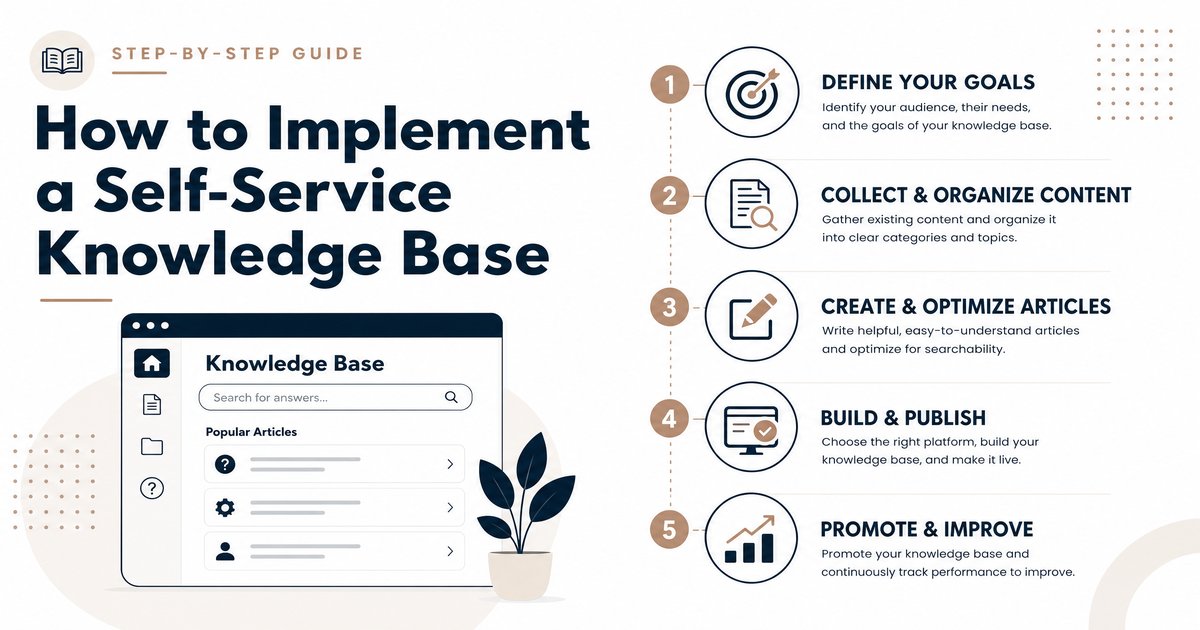
How to Implement a Self-Service Knowledge Base
Introduction
In today’s fast-paced business environment, customers and employees alike expect immediate access to information. A self-service knowledge base is a powerful tool that addresses this need by providing an organized, accessible repository of information, enabling users to find answers independently without requiring direct human interaction [1]. For business owners, founders, marketers, and IT professionals, understanding and implementing an effective self-service knowledge base is crucial for enhancing customer satisfaction, streamlining operations, and ultimately reducing support costs.
What is a Self-Service Knowledge Base?
A self-service knowledge base is essentially a centralized digital library containing articles, FAQs, guides, tutorials, and other relevant content about a product, service, or topic. Its primary purpose is to empower users to resolve their queries autonomously, fostering a sense of independence and efficiency [1]. Key components typically include a robust search engine, categorized content, multimedia support, and mechanisms for user feedback. This transformative resource ensures 24/7 accessibility, consistent and accurate information, and a scalable solution that evolves with the company’s growth [1].
Key Features of an Effective Self-Service Knowledge Base
Implementing a successful self-service knowledge base hinges on selecting software with the right features. These features are designed to optimize content creation, user experience, and overall knowledge management [2].
AI-Powered Content Authoring
Modern knowledge bases often leverage AI-powered content authoring tools to significantly accelerate and simplify content creation. These tools can generate content ideas, suggest improvements in language and style, and even translate articles into multiple languages, ensuring content is well-written, engaging, and accessible to a wider audience [2].
Multi-Branding and Customization
For organizations managing multiple brands or products, multi-branding capabilities allow for the creation and management of separate knowledge bases from a single platform. Furthermore, extensive customization and branding options ensure the knowledge base seamlessly integrates with the company’s brand identity, maintaining a consistent look and feel with logos, colors, and custom domains [2].
Robust Search Functionality
A powerful and intuitive search engine is paramount. Features like auto-complete, search suggestions, and advanced filters enable users to quickly pinpoint the information they need within the knowledge base. This minimizes frustration and enhances the user experience [2].
User Management & Access Control
Depending on the nature of the content, user management and access control features are vital. These allow organizations to control who can access specific content, provide different access levels to various user groups, and even create private knowledge bases for internal teams or premium subscribers [2].
Analytics & Reporting
To continuously improve the knowledge base, analytics and reporting tools are indispensable. They track key metrics such as article views, popular content, search queries, and user feedback. This data helps identify knowledge gaps, understand user behavior, and optimize content to better meet audience needs [2].
Integrations with Other Tools
Seamless integrations with other business tools like CRM or help desk systems streamline workflows and provide a unified customer experience. This allows for efficient data exchange and ensures the knowledge base is an integral part of the broader support ecosystem [2].
Benefits of Implementing a Self-Service Knowledge Base
The advantages of a well-implemented self-service knowledge base extend across various facets of an organization, impacting both internal operations and external customer interactions [1] [3].
- Empowers Agents and Increases Productivity: By automating responses to routine inquiries, agents are freed to focus on more complex issues, boosting their productivity and job satisfaction [1].
- 24/7 Accessibility Increases Customer Satisfaction Rates: Customers can access information anytime, anywhere, leading to quicker issue resolution and higher satisfaction [1].
- Reduced Average Handling Time Boosts Cost Efficiency: A decrease in support tickets and call volumes directly translates to lower operational costs and more efficient resource allocation [1].
- Consistency in Information Across Communication Channels: Ensures that both customers and agents receive uniform and accurate information, building trust and preventing confusion [1].
- More Easily Supports Scalability: As a business grows, the knowledge base can scale to accommodate a larger user base without a proportional increase in support staff [1].
- Better Agent Retention: Empowered agents who can quickly find solutions are more satisfied with their roles, leading to improved retention rates [1].
- Better Customer Experience: Provides a convenient and user-friendly way for customers to get necessary information, positively impacting loyalty [1].
- Continuous Improvement: User feedback mechanisms allow for ongoing enhancements, ensuring the knowledge base remains relevant and effective [1].
Self-Service Knowledge Base Software: Pricing Models
Pricing for self-service knowledge base software varies significantly based on features, user count, and vendor. Common models include:
- Per-User/Per-Agent Pricing: A fee is charged per user or agent who accesses or contributes to the knowledge base. This is common for internal knowledge bases or those with limited external access.
- Feature-Based Tiers: Different pricing tiers offer varying sets of features, with more advanced functionalities (e.g., AI, advanced analytics, multi-branding) typically costing more.
- Volume-Based Pricing: Some platforms charge based on the number of articles, storage used, or API calls.
- Free Tiers/Freemium Models: Many providers offer free plans with limited features, ideal for small businesses or those just starting. Paid plans unlock more capabilities.
Factors influencing cost include the size of your organization, the complexity of your needs, the level of support required, and the desired integrations.
Pros and Cons of Self-Service Knowledge Bases
Pros
Implementing a self-service knowledge base offers numerous advantages:
- Enhanced Customer Satisfaction: Customers appreciate the ability to find answers quickly and independently, leading to a more positive experience.
- Reduced Support Load: By deflecting common inquiries, support teams can focus on more complex and critical issues, improving overall efficiency.
- Cost Savings: Lower call volumes and reduced agent workload translate into significant operational cost reductions.
- 24/7 Availability: Information is accessible around the clock, catering to a global audience across different time zones.
- Improved Consistency: Ensures a single source of truth, providing consistent and accurate information to all users.
- Scalability: Easily accommodates business growth without a linear increase in support resources.
Cons
Despite the benefits, there are potential challenges to consider:
- Initial Setup and Content Creation Effort: Building a comprehensive knowledge base from scratch requires a significant investment of time and resources to create high-quality content.
- Ongoing Content Maintenance: Content must be regularly updated, reviewed, and expanded to remain accurate and relevant. Outdated information can quickly undermine user trust.
- Ensuring Content Accuracy: Maintaining the accuracy of information across a large knowledge base can be challenging, especially in dynamic environments.
- User Adoption: Encouraging users to utilize the self-service option instead of direct support channels requires clear communication and a user-friendly interface.
- Limited for Complex Issues: While excellent for common queries, self-service may not be sufficient for highly complex or unique customer problems that require personalized assistance.
Conclusion
Implementing a self-service knowledge base is no longer a luxury but a necessity for businesses aiming to thrive in the digital age. By empowering customers and employees with instant access to information, organizations can significantly boost satisfaction, reduce operational costs, and enhance overall efficiency. While challenges such as initial setup and ongoing maintenance exist, the long-term benefits of improved scalability, consistency, and customer experience far outweigh these hurdles. A well-planned and executed self-service knowledge base strategy is a cornerstone of modern customer support and business operations.
References
[1] What is a Self-Service Knowledge Base? | Upland Software
[2] Top Features of Self-Service Knowledge Base Software? + Top 5 Tools
[3] How Knowledge Management Systems Encourage Self Service | NiCE