
Expensify Review: Pros, Cons, and Pricing
Expensify Review: Pros, Cons, and Pricing
In today’s fast-paced business environment, efficient expense management is crucial for companies aiming to optimize financial workflows and maintain compliance. Expensify is a popular cloud-based accounting software solution designed to simplify expense reporting and automate reimbursement processes. This comprehensive review will explore Expensify’s key features, advantages, drawbacks, pricing structure, and ultimately help you determine if it is the right fit for your business needs.
Key Features of Expensify
1. Automated Expense Reporting
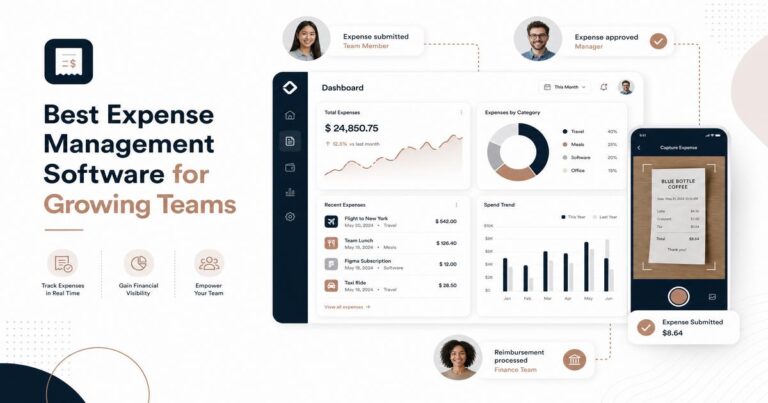
Expensify uses intelligent scanning technology to automatically capture receipt data through its mobile app. Users can simply snap a photo of a receipt, and the software extracts essential details like merchant name, date, and amount, significantly reducing manual data entry.
2. Seamless Integration
Expensify integrates with a wide range of popular accounting and ERP systems such as QuickBooks, Xero, NetSuite, and Sage Intacct. This connectivity ensures smooth data synchronization, allowing finance teams to maintain accurate records without duplicate work.
3. Corporate Card Reconciliation
The platform supports automatic import and reconciliation of corporate credit card transactions, helping businesses maintain visibility and control over employee spending in real time.
4. Multi-Currency and Global Compliance
Expensify supports over 180 currencies and provides automatic currency conversion, which is essential for companies operating globally. The software also helps enforce company policies and tax compliance through customizable approval workflows and auditing tools.
5. Real-Time Expense Tracking and Reporting
Managers and finance teams can access dashboards that provide up-to-date expense reports, enabling quicker decision making and budget control.
6. User-Friendly Mobile App
Expensify’s mobile application, available on iOS and Android, offers on-the-go expense submission, receipt capture, and approval processes, enhancing productivity for mobile employees.
Pros of Using Expensify
- Intuitive interface: The platform is easy to navigate for both employees and finance teams.
- Time-saving automation: Automated receipt scanning and corporate card reconciliation reduce administrative workload.
- Robust integrations: Supports major accounting software, enhancing workflow efficiency.
- Flexible policy enforcement: Customizable approval workflows ensure compliance with company expense policies.
- Mobile accessibility: The app allows users to manage expenses wherever they are.
- Scalability: Suitable for small businesses to large enterprises with varying expense management needs.
Cons of Using Expensify
- Pricing complexity: Some users find the pricing tiers and add-ons confusing, which can complicate budgeting.
- Limited offline functionality: The app requires internet access for full functionality, which may be restrictive in some environments.
- Occasional OCR errors: Although receipt scanning is generally accurate, some users report errors that require manual correction.
- Learning curve: Advanced features and customization may require initial training for optimal use.
Expensify Pricing
Expensify offers a tiered pricing model designed to accommodate different business sizes and needs. Below is an overview of the main plans:
- Free Plan: Ideal for individuals or very small teams, includes basic expense tracking and receipt scanning with limited monthly submissions.
- Team Plan: Priced at $5 per active user per month, this plan adds features such as automated approval workflows, corporate card reconciliation, and integrations suitable for small to medium-sized businesses.
- Corporate Plan: Pricing is customized based on company size and needs. It includes advanced policy controls, enhanced compliance features, and priority support, tailored for larger enterprises.
Expensify also offers add-ons such as GPS mileage tracking and additional integrations, which may incur extra charges depending on your subscription.
Final Verdict
Expensify is a powerful and versatile expense management solution that excels in automating the tedious and error-prone aspects of expense reporting. Its robust integration capabilities and user-friendly design make it a strong contender for businesses ranging from startups to large enterprises.
Strengths: Automated receipt scanning, seamless integration with major accounting platforms, and a highly accessible mobile app provide significant operational efficiencies. The platform’s ability to enforce customizable policies and support multi-currency transactions adds value for companies with complex expense management requirements.
Considerations: Potential buyers should be aware of pricing complexities and the occasional need for manual receipt data correction. Organizations with limited internet access may find the mobile app’s dependence on connectivity restrictive.
Frequently Asked Questions
How does Expensify pricing compare to other expense management software?
Expensify offers a straightforward pricing model starting at $5 per user per month, which is competitive for small to medium businesses compared to more complex tiered pricing from competitors.
What are the key features that make Expensify suitable for small businesses?
Expensify provides automated receipt scanning, real-time expense reporting, and seamless integrations with popular accounting software, making it ideal for small businesses seeking efficiency.
Is Expensify better for personal use or corporate expense management?
Expensify is primarily designed for corporate expense management with features like multi-level approval workflows, though individuals can also benefit from its personal expense tracking tools.
Overall, Expensify offers a comprehensive, scalable solution that can help finance teams streamline expense workflows, improve compliance, and gain real-time insights into company spending. For businesses seeking to modernize their expense management processes, Expensify is a compelling choice worthy of consideration.


One Comment