
How to Build a High-Performing Remote Team with SaaS Tools
Introduction: Building a Resilient Remote Team with SaaS Tools
In today’s dynamic business landscape, remote work has transitioned from a temporary solution to a fundamental operational model for many organizations. The ability to build and manage a high-performing remote team is no longer a luxury but a necessity for sustained growth and competitiveness. This guide will delve into how SaaS (Software as a Service) tools can be leveraged to create a cohesive, productive, and engaged remote workforce, ensuring seamless collaboration, efficient project management, and robust communication.
The Foundation of a High-Performing Remote Team
Clear Communication Channels
Effective communication is the bedrock of any successful team, and it becomes even more critical in a remote setting. Misunderstandings can easily arise without the nuances of in-person interactions. SaaS communication tools bridge this gap, providing platforms for real-time discussions, structured updates, and asynchronous collaboration.
- Instant Messaging & Collaboration Platforms: Tools like Slack, Microsoft Teams, and Google Chat offer instant messaging, group channels, and direct calls, fostering quick decision-making and a sense of community.
- Video Conferencing Solutions: Zoom, Google Meet, and Cisco Webex enable face-to-face interactions, crucial for team meetings, client presentations, and building rapport.
- Asynchronous Communication Tools: Platforms such as Loom or Twist allow team members to share video messages or detailed written updates, reducing the need for immediate responses and accommodating different time zones.
Robust Project Management
Managing projects remotely requires a centralized system to track progress, assign tasks, and ensure accountability. SaaS project management tools provide the necessary framework to keep everyone aligned and productive.
- Task Management & Workflow Automation: Tools like Asana, Trello, Jira, and Monday.com offer visual boards, task assignments, deadlines, and progress tracking. Many also integrate with other SaaS applications to automate workflows.
- Document Collaboration & Storage: Google Workspace (Docs, Sheets, Slides) and Microsoft 365 (Word, Excel, PowerPoint) facilitate real-time co-editing and secure cloud storage, ensuring all team members have access to the latest versions of documents.
- Version Control Systems: For development teams, GitHub or GitLab are indispensable for managing code, tracking changes, and facilitating collaborative coding efforts.
Performance Monitoring & Feedback
Maintaining high performance in a remote team requires consistent monitoring and a structured feedback loop. SaaS tools can help track individual and team performance, identify areas for improvement, and facilitate constructive feedback.
- Performance Management Software: Platforms like Lattice or 15Five provide tools for setting goals, conducting performance reviews, and facilitating one-on-one meetings.
- Time Tracking & Productivity Tools: While not always necessary, tools like Toggl Track or Clockify can help teams understand how time is spent, identify bottlenecks, and optimize workflows.
- Employee Engagement Surveys: Tools such as Culture Amp or SurveyMonkey allow organizations to gather feedback on employee satisfaction, identify pain points, and measure engagement levels.
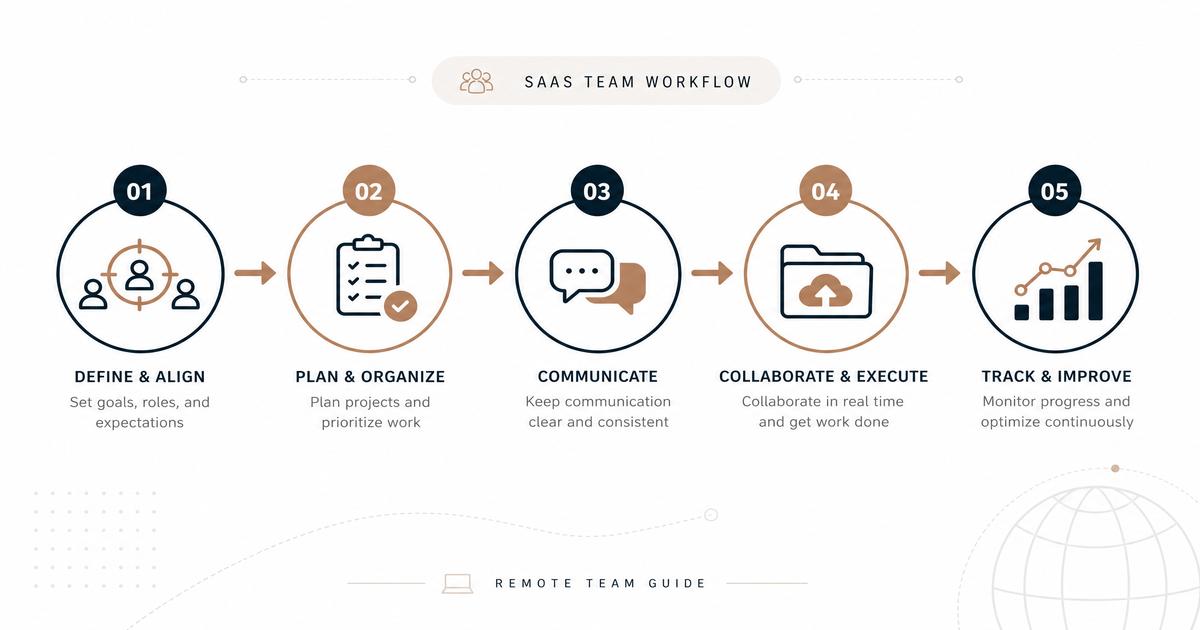
Step-by-Step Guide to Building Your Remote Team with SaaS Tools
Step 1: Define Your Remote Work Strategy
Before selecting any tools, clearly define your remote work philosophy, policies, and expectations. Consider:
- What are your communication protocols (e.g., response times, preferred channels)?
- How will you manage time zones and work schedules?
- What are the key performance indicators (KPIs) for remote employees?
- How will you foster team culture and connection remotely?
Step 2: Assess Your Current Tool Stack & Identify Gaps
Review the SaaS tools you currently use. Are they optimized for remote collaboration? Identify areas where your existing tools fall short or where new tools could significantly enhance remote operations. Look for:
- Lack of real-time collaboration features.
- Difficulty in sharing and accessing files securely.
- Inefficient project tracking and task management.
- Limited communication options beyond email.
Step 3: Select the Right SaaS Tools
Based on your strategy and identified gaps, research and select SaaS tools that align with your needs. Prioritize tools that offer:
- Integration Capabilities: Tools that seamlessly integrate with each other reduce friction and improve workflow efficiency.
- Scalability: Choose tools that can grow with your team and business needs.
- Security: Ensure the tools comply with data privacy regulations and offer robust security features.
- User-Friendliness: Tools that are intuitive and easy to adopt will have higher team buy-in and utilization.
- Customer Support: Reliable support is crucial for troubleshooting and maximizing tool effectiveness.
Step 4: Implement & Onboard Your Team
Once you’ve selected your tools, implement them systematically. Provide comprehensive training and clear guidelines for their use. A smooth onboarding process is vital for successful adoption.
- Create User Guides & Tutorials: Document how each tool should be used within your team’s specific workflows.
- Conduct Training Sessions: Offer live training, Q&A sessions, and ongoing support.
- Establish Best Practices: Define how each tool contributes to your overall remote work strategy.
Step 5: Foster a Culture of Trust & Transparency
SaaS tools are enablers, but a strong remote culture is built on trust and transparency. Encourage open communication, celebrate successes, and provide opportunities for informal interactions.
- Regular Check-ins: Schedule regular team and individual check-ins to discuss progress, challenges, and well-being.
- Virtual Social Events: Organize virtual coffee breaks, game nights, or team-building activities to maintain social connections.
- Recognize & Reward: Acknowledge and celebrate team members’ contributions and achievements.
Step 6: Continuously Evaluate & Optimize
The remote work landscape is constantly evolving. Regularly evaluate the effectiveness of your SaaS tools and make adjustments as needed. Gather feedback from your team and stay updated on new tools and features.
- Solicit Feedback: Regularly ask team members for their input on the tools and processes.
- Monitor Usage & Effectiveness: Track how tools are being used and if they are achieving their intended purpose.
- Stay Agile: Be prepared to adapt your tool stack and strategies as your team’s needs change.
Key SaaS Tools for Remote Team Success
Here’s a table summarizing essential SaaS categories and popular tools:
| Category | Key Features | Popular Tools | Price Indication (per user/month, approximate) |
|---|---|---|---|
| Communication | Instant messaging, video calls, group channels, file sharing | Slack, Microsoft Teams, Google Chat, Zoom | Free (basic) – $15+ |
| Project Management | Task tracking, workflow automation, visual boards, deadlines | Asana, Trello, Jira, Monday.com | Free (basic) – $25+ |
| Document Collaboration | Real-time co-editing, cloud storage, version history | Google Workspace, Microsoft 365 | $6 – $20+ |
| Performance Management | Goal setting, performance reviews, 1:1s, feedback | Lattice, 15Five | $10 – $20+ |
| Time Tracking | Activity monitoring, timesheets, reporting | Toggl Track, Clockify | Free (basic) – $10+ |
| CRM (Customer Relationship Management) | Sales tracking, customer data, marketing automation | Salesforce, HubSpot, Zoho CRM | $25 – $300+ |
| HR & Payroll | Employee onboarding, benefits, payroll processing | Gusto, BambooHR, Workday | $40 – $100+ (per employee/month) |
Conclusion: Empowering Your Remote Workforce
Building a high-performing remote team is an ongoing journey that requires strategic planning, the right tools, and a commitment to fostering a supportive culture. By thoughtfully integrating SaaS solutions for communication, project management, performance tracking, and more, organizations can empower their remote employees to collaborate effectively, stay productive, and achieve their goals, regardless of their physical location. Embrace these tools not just as utilities, but as integral components of a thriving, future-ready remote enterprise.
Ready to optimize your remote team’s performance? Explore SaaSSync Pro for in-depth reviews and comparisons of the best SaaS tools for remote work.

