How to Migrate Your CRM Data Without Losing a Single Lead
Migrating your Customer Relationship Management (CRM) data is a critical process that, if not handled carefully, can lead to significant disruptions and, more importantly, the loss of valuable leads. In today’s competitive business landscape, every lead counts, and a seamless transition to a new CRM system is paramount for maintaining business continuity and growth. This comprehensive guide will walk you through the essential steps to migrate your CRM data effectively, ensuring that not a single lead is left behind.
Whether you’re upgrading your existing CRM, switching to a new vendor, or consolidating multiple systems, the principles of a successful data migration remain consistent. By following a structured approach, you can minimize risks, optimize data integrity, and empower your sales and marketing teams with accurate, up-to-date customer information from day one.
1. Comprehensive Planning: The Foundation of Success
A successful CRM data migration begins long before any data is moved. Thorough planning is the most crucial step to avoid pitfalls and ensure a smooth transition. This involves defining your objectives, assembling a dedicated team, and setting realistic timelines.
Define Your Objectives and Scope
Before you start, clearly articulate why you are migrating your CRM data. Are you seeking better automation, improved reporting, or enhanced integration capabilities? Understanding your goals will help you define the scope of the migration.
- Identify Key Stakeholders: Involve representatives from sales, marketing, customer service, and IT. Their input is vital for understanding data usage and requirements.
- Set Clear Goals: What do you hope to achieve with the new CRM? Define measurable objectives, such as improved lead conversion rates or reduced customer churn.
- Determine Scope: Which data needs to be migrated? Consider contacts, leads, accounts, opportunities, activities, and custom objects. Avoid migrating unnecessary historical data that could clutter your new system.
Assemble Your Migration Team
A dedicated team with clear roles and responsibilities is essential. This team should include:
- Project Manager: Oversees the entire migration process, ensuring timelines are met and resources are allocated effectively.
- Data Experts: Individuals familiar with your current CRM data structure and the data requirements of the new system.
- IT Support: To handle technical aspects, integrations, and potential issues.
- End-User Representatives: To provide feedback and ensure the new system meets operational needs.
Establish a Realistic Timeline and Budget
Data migration is complex and can take time. Create a detailed project plan with milestones and deadlines. Account for potential delays and allocate sufficient budget for tools, training, and expert assistance if needed.
2. Data Audit and Cleansing: Ensuring Data Quality
Migrating dirty or redundant data will only transfer existing problems to your new CRM. A thorough data audit and cleansing process is crucial for data integrity and the effectiveness of your new system.
Identify and Remove Duplicate Records
Duplicate leads and contacts can skew your analytics, annoy customers, and waste sales efforts. Use CRM tools or third-party solutions to identify and merge duplicate records.
Standardize Data Formats
Inconsistent data formats (e.g., different date formats, inconsistent state abbreviations) can cause errors during import. Standardize all data fields to match the requirements of your new CRM.
Cleanse Incomplete or Outdated Information
Remove old, irrelevant, or incomplete data. This includes leads that have gone cold, contacts with invalid email addresses, or accounts that are no longer active. The less junk you migrate, the cleaner and more efficient your new system will be.
Enrich Your Data
While cleansing, consider enriching your data with valuable information from external sources. This could include industry classifications, company size, or social media profiles, which can enhance your segmentation and targeting capabilities.
3. Data Backup and Export: Safeguarding Your Information
Before initiating any migration, always create a complete backup of your existing CRM data. This serves as a safety net in case anything goes wrong during the migration process.
Perform a Full Data Backup
Utilize your current CRM’s native backup features or export all data to a secure location. Ensure the backup includes all relevant modules: leads, contacts, accounts, opportunities, activities, and any custom fields.
Export Data from Your Old CRM
Most CRMs allow data export in various formats, such as CSV, Excel, or XML. CSV is often the most flexible for migration purposes. Export data in manageable chunks if you have a very large dataset to avoid system timeouts or file size limitations.
- Check Export Limits: Be aware of any export limits imposed by your current CRM.
- Verify Data Integrity: After export, open a sample of the exported files to ensure data is intact and correctly formatted.
4. Data Mapping and Transformation: Bridging the Gap
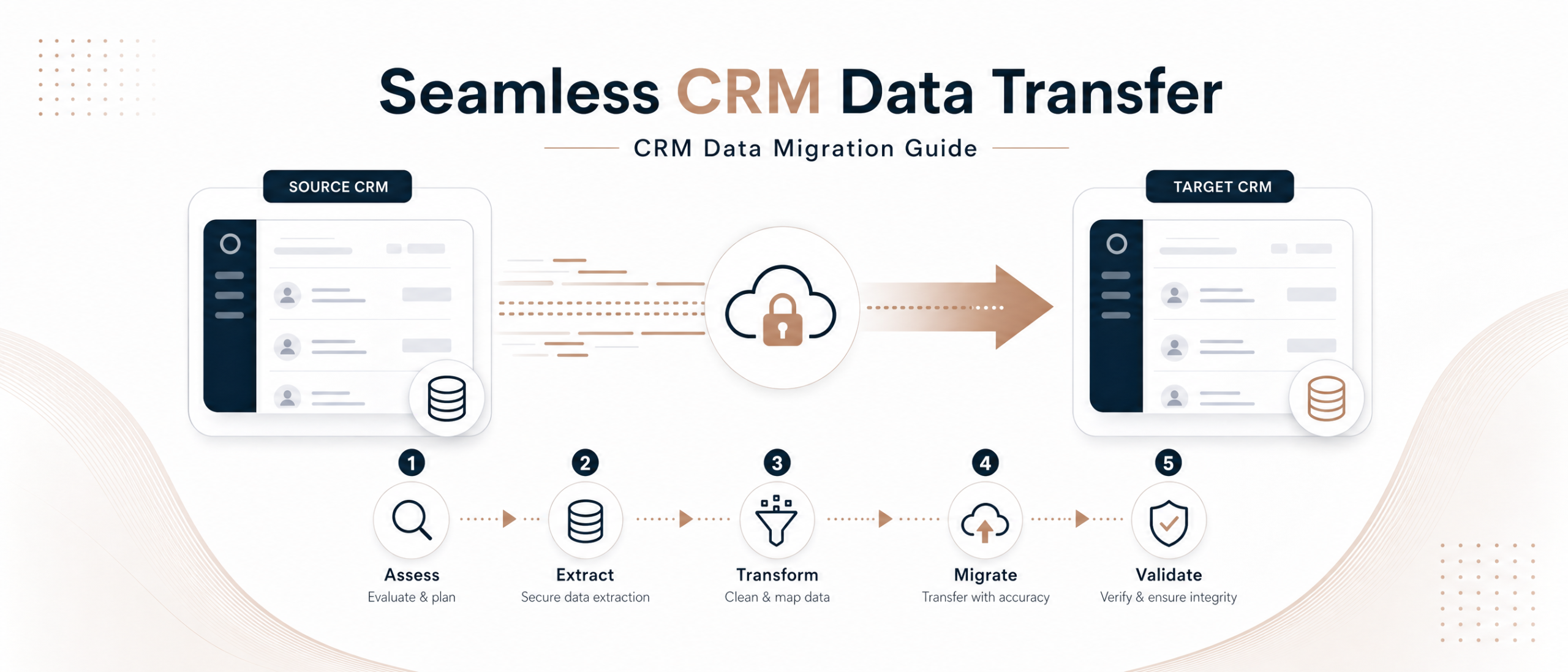
Data mapping is the process of matching fields from your old CRM to corresponding fields in your new CRM. This is a critical step to ensure data lands in the correct places and remains meaningful.
Create a Detailed Data Mapping Document
This document should list every field from your old CRM and its corresponding field in the new system. Pay close attention to:
- Standard Fields: (e.g., First Name, Last Name, Email) are usually straightforward.
- Custom Fields: These require careful consideration. Decide whether to recreate them in the new CRM or merge them into existing standard fields.
- Required Fields: Ensure all mandatory fields in the new CRM have a source in your old data.
- Data Types: Confirm that data types (text, number, date, picklist) are compatible between systems.
Perform Data Transformation
Often, data from your old CRM won’t perfectly match the format required by the new system. Data transformation involves modifying the exported data to fit the new CRM’s structure.
- Use ETL Tools: For complex migrations, consider using Extract, Transform, Load (ETL) tools. These tools can automate the mapping and transformation process, reducing manual effort and errors.
- Manual Adjustments: For smaller datasets, manual adjustments in spreadsheet software might suffice. Be meticulous to avoid errors.
- Value Conversion: Convert picklist values (e.g., old CRM status values like “Open”, “Working”, “Closed Won” to new CRM values like “New Lead”, “Qualified”, “Converted”).
5. Phased Import and Validation: A Controlled Approach
Instead of a ‘big bang’ migration, a phased approach minimizes risk and allows for validation at each stage. This is especially crucial for large datasets.
Start with a Small Pilot Migration
Migrate a small subset of your data first. This allows you to test your mapping, transformation, and import processes without affecting your entire dataset. Identify and resolve any issues before proceeding with the full migration.
Import Data in Batches
For larger migrations, import data in logical batches (e.g., contacts first, then accounts, then opportunities). This makes it easier to track progress, identify errors, and manage the process.
Validate Data After Each Import
After each batch import, thoroughly validate the data in the new CRM. Check for:
- Record Counts: Ensure the number of records matches the exported data.
- Data Accuracy: Spot-check individual records to confirm data has been imported correctly.
- Relationships: Verify that relationships between records (e.g., contacts linked to accounts) are intact.
- Field Values: Confirm that all field values are in the correct format and display as expected.
6. Post-Migration Testing and Training: Ensuring User Adoption
The migration isn’t complete until your team can effectively use the new CRM. Thorough testing and comprehensive training are vital for user adoption and maximizing your investment.
Conduct User Acceptance Testing (UAT)
Involve key users from sales, marketing, and customer service to test the new system. They should perform their daily tasks using the migrated data to ensure everything functions as expected. Gather feedback and address any issues promptly.
Provide Comprehensive Training
Even if your new CRM is intuitive, training is essential. Cover basic navigation, data entry, reporting, and any new features. Offer different training formats (e.g., workshops, online modules, one-on-one sessions) to cater to diverse learning styles.
Monitor Performance and Address Issues
After going live, closely monitor the new CRM’s performance. Be prepared to address any data discrepancies, system glitches, or user questions that arise. Establish a clear support channel for your team.
Conclusion: A Smooth Transition to Enhanced Efficiency
Migrating CRM data without losing a single lead is an achievable goal with careful planning, meticulous execution, and thorough validation. By following these steps—from comprehensive planning and data cleansing to phased import and post-migration testing—you can ensure a smooth transition to your new CRM system. This not only safeguards your valuable lead data but also sets the stage for improved operational efficiency, better customer insights, and ultimately, business growth.
Don’t let the fear of data loss deter you from upgrading your CRM. With the right strategy, your migration can be a catalyst for significant improvements in how you manage customer relationships and drive sales. Ready to optimize your CRM strategy? Explore SaaSSync Pro for expert reviews and comparisons of leading CRM software to find the perfect fit for your business needs.